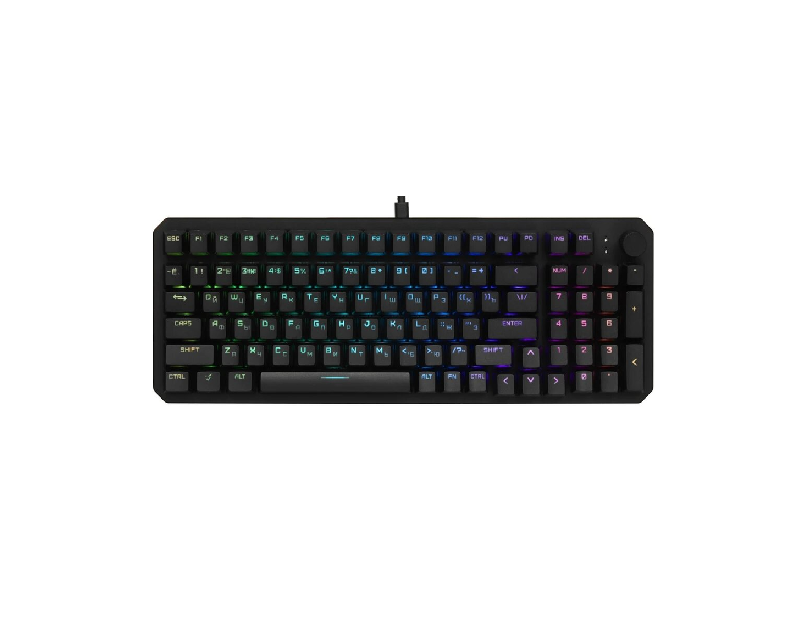
ARDOR GAMING AG-ODM-B98-RED-B Mechanical Gaming Keyboard User Manual
Wired Keyboard
ARDOR GAMING Blade 98
User Manual
Dear Customer,
Thank you for your trust!
Our team fully shares your passion for computer games, which is why we put all our efforts into making your gaming experience unforgettable with our accessories for gamers . Wishing you new victories and the brightest impressions ahead!
Intended Use
The keyboard is an input device designed for typing text and issuing commands to the computer.
Safety Precautions
- Do not make any modifications to the device’s design.
- Do not expose the device to electromagnetic radiation.
- Protect the device from moisture, dust, and extreme temperatures.
- To avoid a short circuit, do not expose the device to any liquids, and do not place open containers of liquid near it.
- Do not use the device if visible damage is detected. Unplug it immediately and contact an authorized service center.
- This device is not intended for use by persons (including children) with reduced physical, sensory or mental capabilities, or lack of experience and knowledge, unless they have been given supervision or instruction concerning use of appliance by a person responsible for their safety. Children should be supervised to ensure that they do not play with the device.
- This device is not intended for commercial use.
Specifications
- Model: AG-ODM-B98-Red-B
- Trademark: ARDOR GAMING
- Power supply: 5 V ⎓ 350 mA
- Switch lifespan: Up to 70 million keystrokes
- Total number of keys: 98
- Kailh RED V2 Linear Switches
- Number of backlight modes: 16
- RGB backlighting with extensive customization options via software
- Base material: Metal, plastic
- Weight: 824 ± 10 g
- USB cable length: 1.8 m
- Device dimensions (W × D × H): 381.4 × 134.4 × 38.4 mm
- OS Compatibility: Windows
- Scope of application: Domestic
Package Contents
- Device
- Stickers
- USB cable
- Dual key cap puller
- Extra switches
- User manual
Device Diagram
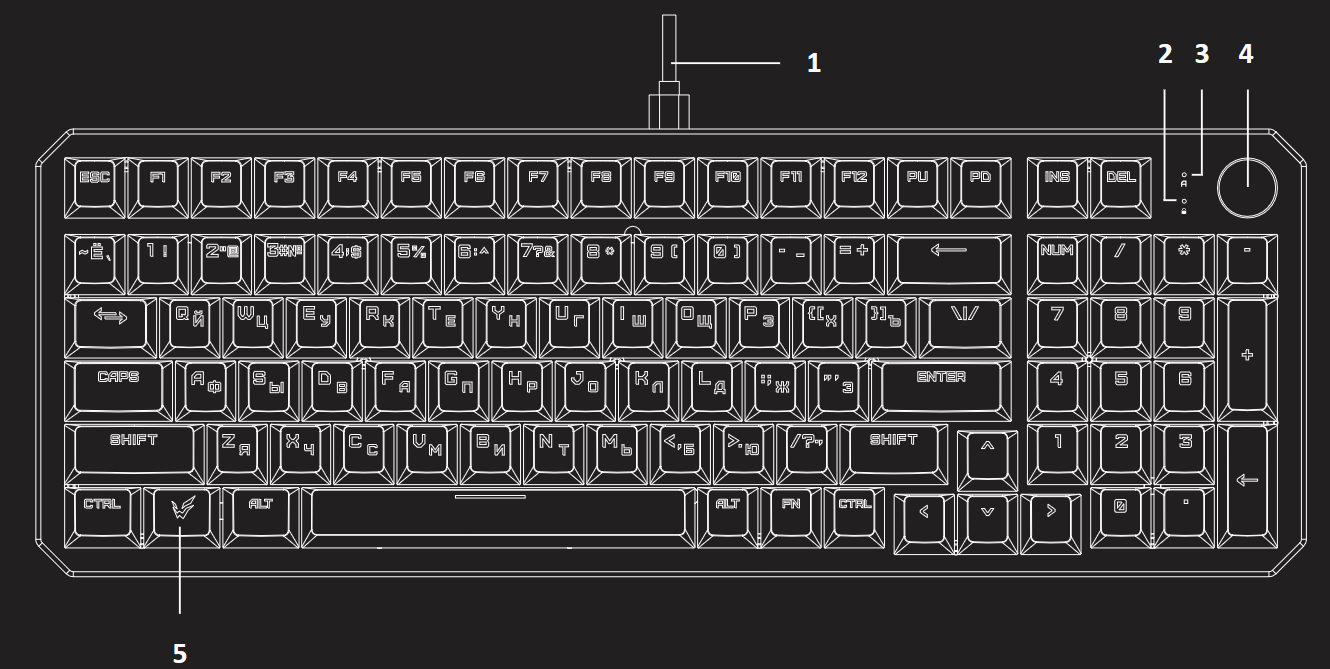
- Power cable
- Windows key lock indicator
- Caps Lock indicator
- Rotary volume knob
- Windows key
Key Abbreviation Legend
- INS: Insert
- DEL: Delete
- PD: Page Down
- PU: Page Up
- PS: Print Screen
- SL: Scroll Lock
Operating Instructions
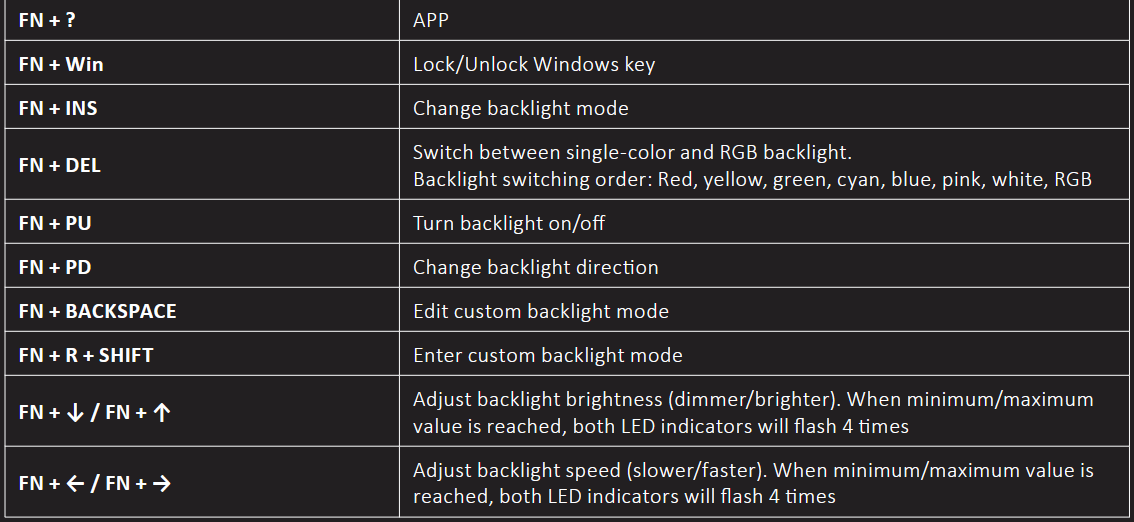
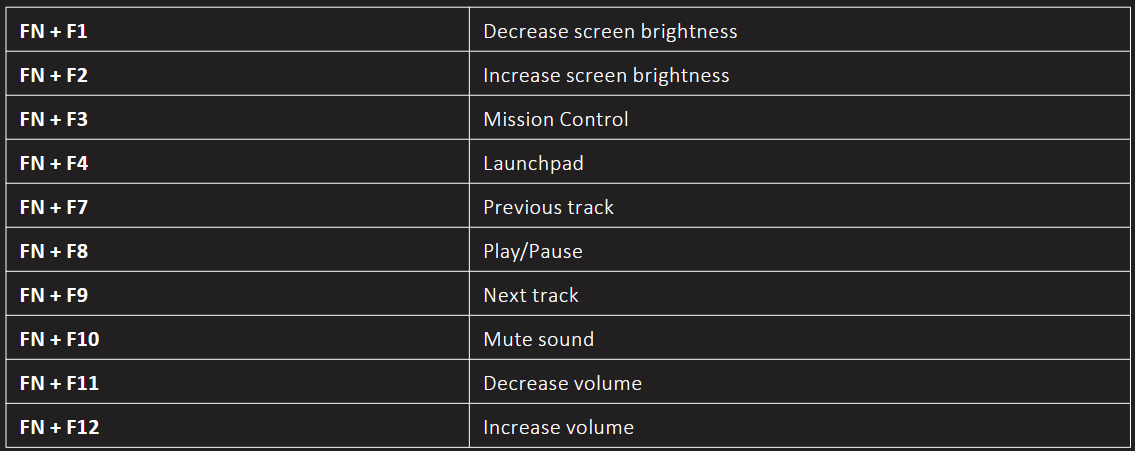
Keyboard Shortcuts
Windows
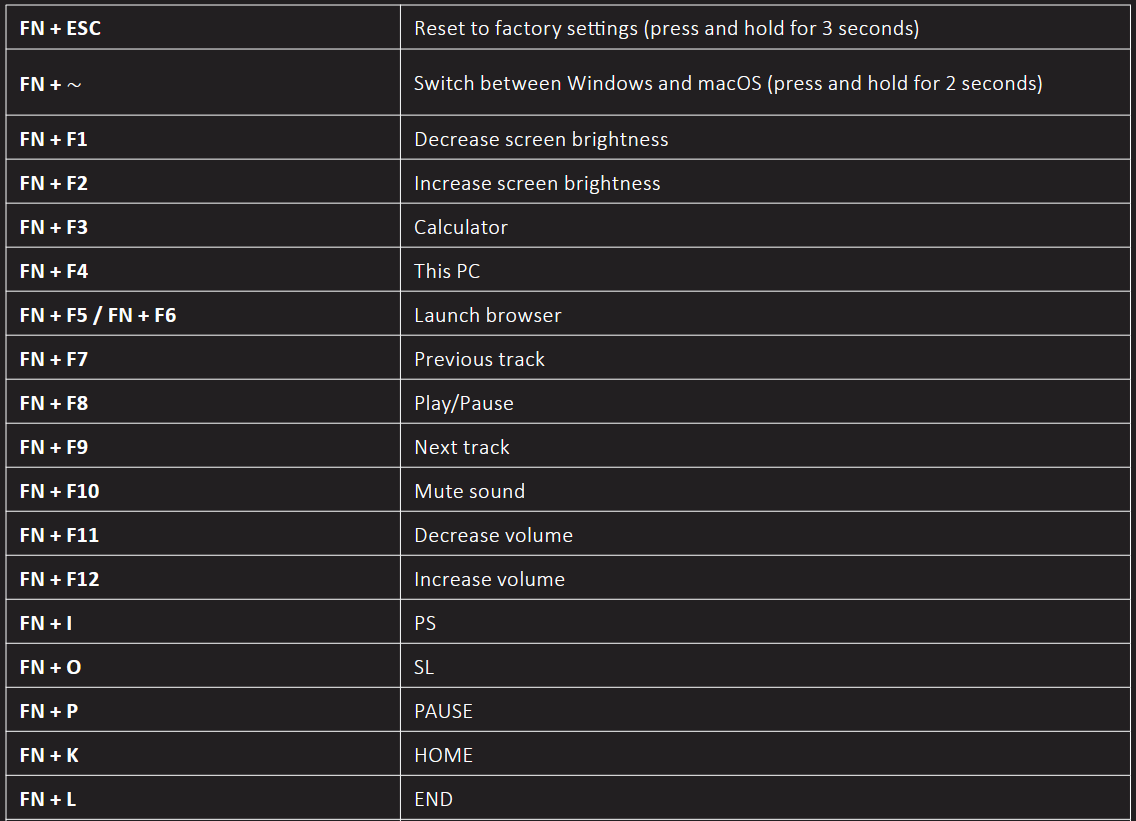
macOS
LED Indicators
- When the Caps Lock key is pressed, the upper indicator lights up white. Pressing the key again turns the indicator off.
- When the Windows key is locked, the lower indicator lights up white. Unlocking the key turns the indicator off.
Custom Key Backlight Mode (Design It Yourself)
You can create your own mode and independently choose which keys will be backlit.
- To enter custom backlight mode, press FN + BACKSPACE — both LED indicators, as well as the FN and BACKSPACE keys, will flash white.
- Next, all keys that you press will be constantly lit. Each subsequent press of a key will change its color. A total of 8 colors are available to choose from. The ninth consecutive press of a key will turn off its backlight.
- Press FN + BACKSPACE to save the created mode.
- To switch to your custom mode at any time, press FN + R + SHIFT.
Rotary Knob
The rotary knob located in the upper right corner of the keyboard is designed to adjust media playback volume.
Rules and Conditions for Installation, Storage, Transportation, Sale (Distribution), and Disposal
- This device requires no assembly or mounting.
- The device must be stored in its original packaging, on heated premises, both at the manufacturer’s and at the consumer’s sites. The ambient temperature should be between +5 °C and +40 °C, and the relative humidity should not exceed 80% (non-condensing). The storage area must be free from aggressive contaminants (e.g., acid or alkali vapors) that could cause corrosion.
- The device must be transported in a dry place.
- The device requires careful handling. Protect it from exposure to dust, dirt, impact, moisture, fire, and other hazards.
- Sale or distribution of the device must be carried out in accordance with local legislation.
- If a device malfunction is detected, immediately contact an authorized service center or dispose of the device.
- Upon expiration of the device’s service life, it must not be disposed of with unsorted household waste. Instead, it must be taken to an authorized collection point for electrical and electronic equipment for subsequent recycling and disposal in accordance with federal or local legislation. By ensuring proper disposal of this product, you help conserve natural resources and prevent potential harm to the environment and human health that may result from improper handling. For more detailed information about collection and disposal points for this product, please contact your local municipal authorities or your household waste disposal service.
Warranty Information
The manufacturer guarantees the device will function properly throughout the warranty period and be free from defects in materials and assembly. The warranty period commences on the date of purchase and applies to new products only. Warranty service includes free repair or replacement of defective parts that fail during the warranty period, provided the failure is not caused by consumer misuse and the product is operated in accordance with the user manual. Repairs or part replacements shall be performed at authorized service centers.
Warranty Period: 24 months.
Service Life: 36 months.
For the up-to-date list of authorized service centers, please visit: https://www.dns-shop.ru/service-center/
Additional Information
Manufacturer: FL ESPORTS ELECTRONICS CO., LTD.
Building B, Wangwuzhou Industrial Zone, Shilong Town, Dongguan City, Guangdong, China.
Made in China.
The product meets the requirements of the technical regulations of the TR CU (EAEU).
Product specifications, information and appearance are subject to change without prior notice, for quality improvement of our products.

 ARDOR-GAMING.COM
VK.COM/ARDOR_GAMING
https://vk.com/ardor_gaming