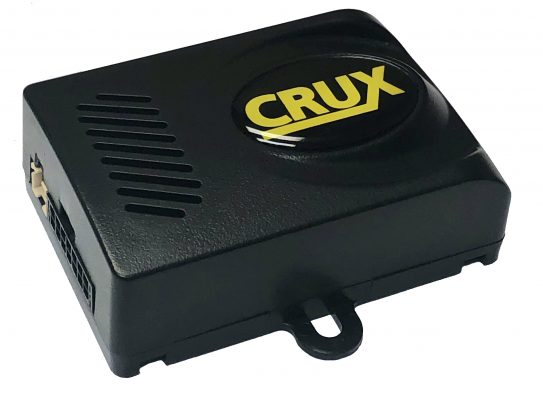

PRODUCT FEATURES:
– Illuminated 3-key wired remote control for easy access to functions.
– Voice dial function (voice tags) on compatible phones.
– Automatic radio mute function when call is received.
– Capable of pairing 2 phones at the same time.
– A2DP music streaming capability on 4 speakers.
– Power/Speaker harness with ISO connectors.
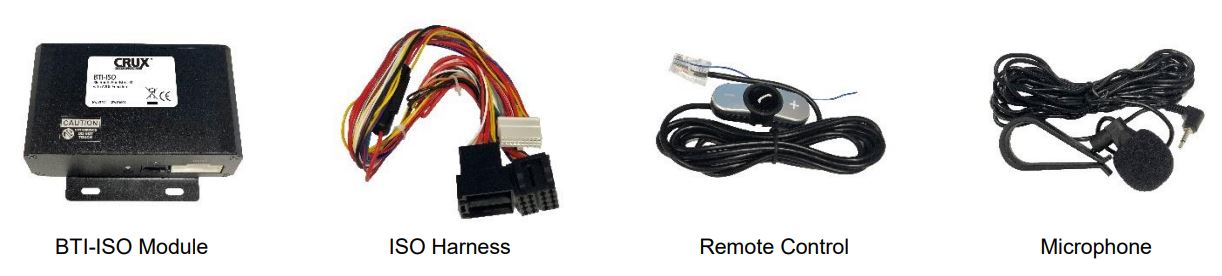
PARTS INCLUDED:
INSTALLATION DIAGRAM:
INSTALLATION:
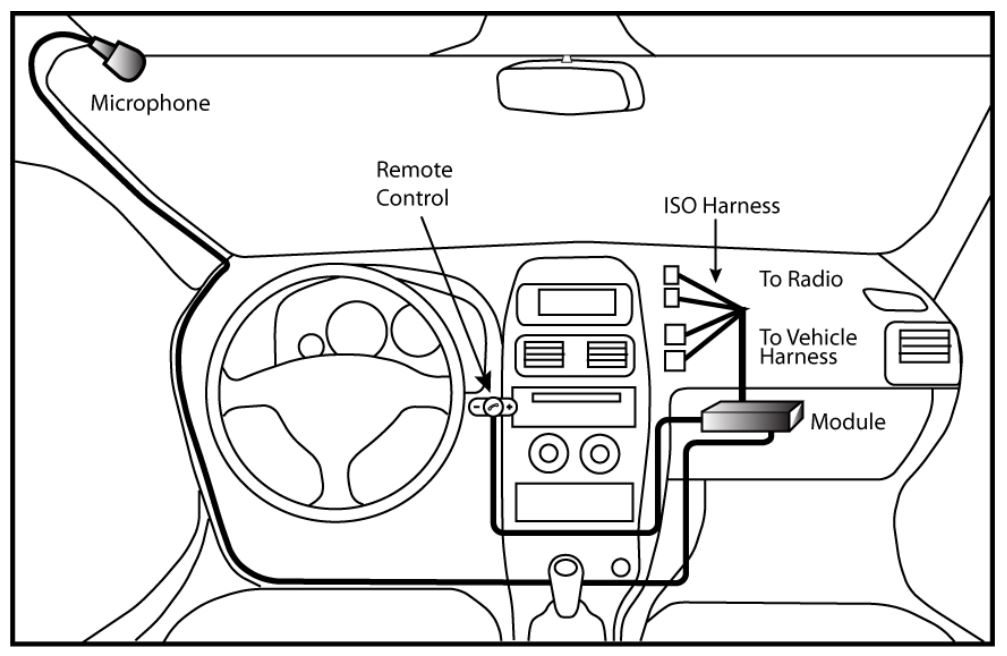
- Choose an easily accessible location to mount the illuminated remote control on the dashboard.
- Use a cleaning cloth to remove grease or dirt from the surface and attach the remote control.
- Run the microphone cable towards a suitable location for the microphone. We recommend installing it at the A pillar or on the sun visor.
- Run the cable to where the BTI-ISO module will be installed. It can be mounted behind the radio or behind the glove box.
- Plug the microphone, speaker and ISO harness to the module.
- Remove the radio and unplug the ISO connectors from behind the radio.
- Plug the male ISO connectors of the ISO Harness to the back of the radio.
- Plug the OEM ISO connectors to the female ISO connectors of the ISO harness.
- Reinstall the radio back into the dashboard.
PAIRING THE PHONE:
- Turn the Bluetooth function on the phone.
- Place the phone close to the BTI-ISO module (at least 3 feet or closer).
- Turn the vehicle key to ACC.
- Wait for your phone to show the BTI-ISO and pair to it.
- When the pairing is complete, BTI-ISO will show “Connected” on the list of Bluetooth devices.
PAIRING TO A SECOND PHONE:
- Once the BTI-ISO is paired to the first phone, turn OFF the Bluetooth function on the first paired phone.
- Pair the second phone following steps 1 to 5 above.
- Turn ON Bluetooth function on the first phone.
- Cycle the vehicle key, from ACC to OFF then back to ACC and wait for the radio to boot. Both phones will now be connected to the BTI-ISO.
- If a call is received on the first phone that was paired, the BTI-ISO will automatically connect to the first phone. If a call is received on the second phone, the BTI-ISO will automatically connect to the second phone.
The BTI-ISO will automatically reconnect to the first phone that was paired when the vehicle is turned on. If it does not connect, press and hold the middle button on the remote control for more than 2 seconds to manually connect.
To delete all paired phones from the BTI-ISO, press and hold the VOLUME + and VOLUME – simultaneously for 5 seconds. All paired phones will be deleted.
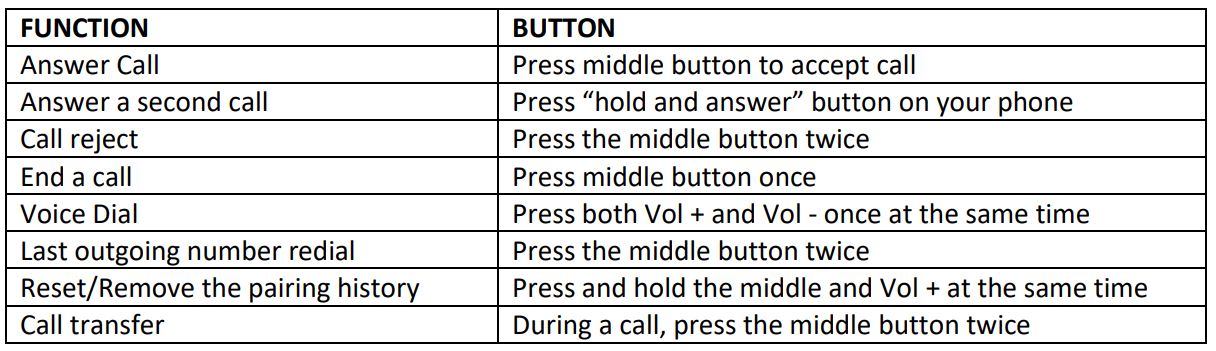
REMOTE CONTROL BUTTONS FUNCTIONS:
PICKING CALLS:
The BIT-ISO can be paired to two phones simultaneously. When a call is in progress on the first phone paired and another call is received on the second phone, press the middle button on the remote control to put the call on the first phone on hold and pick up the call from the second phone. To end the call from the second phone, press and hold the middle button on the remote control for 2 to 3 seconds and the call on the first phone will resume.
To reject an incoming call, press and hold the phone button for 1 second. The phone button light will blink white and blue.
If music is playing using the A2DP feature of the BTI-ISO and a call is received, a short press of the middle button will stop the music playing from the phone or radio and pick up the call. The phone button light will also blink white and blue. A short press of the middle button will end the call and music will resume. The
middle button light will blink white and blue indicating that the music is playing from the phone. Middle button will light up blue only indicating music is playing from the car audio system.
A2DP FEATURE:
The BTI-ISO can stream music from your phone to the audio system of the vehicle. To do this, the phone must be paired to the BTI-ISO. Follow the steps on PAIRING THE PHONE section on page 2. Once the phone is paired to the BTI-ISO, play music on the phone and the audio will be heard on the vehicle’s speakers. Use the BTI-ISO remote control buttons to change volume and skip songs. Press the middle button of the BTI-ISO remote control to pause/play the music. The radio buttons/knobs will not be functional in A2DP mode.
To toggle playing music between the phone and car audio system, press and hold the middle button on the remote control for 3 seconds. The middle button light will blink white and blue indicating that the music is playing from the phone. Middle button will light up blue only indicating music is playing from the car audio system.
To skip songs while in A2DP mode, a long press of the VOLUME + will skip forward and a long press of the VOLUME – will skip back.
To adjust music volume while in A2DP mode, press the VOLUME + or VOLUME – repeatedly to increase or decrease the volume. Check that the volume level on the phone is at 75%. The BTI-ISO has a 15-step volume adjustment feature. A tone will be heard with each step.
NOTE: The radio buttons/knobs will not be functional in A2DP mode.
VOICE DIAL FUNCTION:
To use the Voice Dial Function of the BTI-ISO, press the VOLUME + and VOLUME – of the remote control to put the BTI-ISO in Voice Dial Mode. Speak the voice tags (contact name) saved on your phone loud and clear towards the microphone. The BTI-ISO will dial the voice tag (contact number) automatically.
