
BTCR-35X Bluetooth Handsfree + 4 Channel Audio Streaming + Auxiliary Input for Select Chrysler, Dodge and Jeep Vehicles User Manual

BTCR-35X Bluetooth Handsfree or Four Channel Audio Streaming or Auxiliary Input for Select Chrysler, Dodge and Jeep Vehicles User Manual - BTCR-35X Bluetooth Handsfree or 4 Channel Audio Streaming

PRODUCT FEATURES:

– Adds Bluetooth Handsfree Calling to the OEM radio.
– Adds 4 channel Bluetooth Music streaming.
– Adds an auxiliary audio input.
– Automatically pauses BT Streaming when a call is received, and resumes when the call is ended.
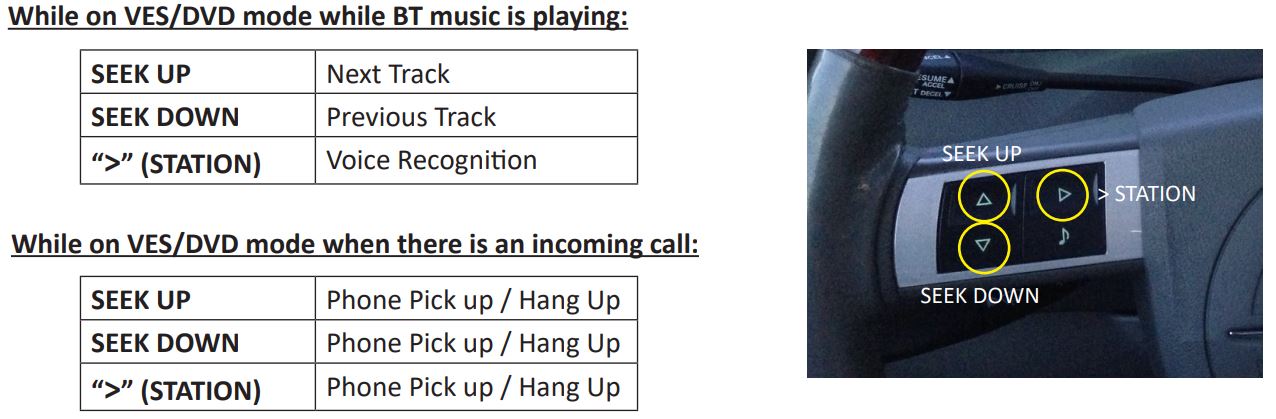
– Allows user to answer, end calls track up and track down using the steering wheel controls.
– DSP and Echo-Cancellation allows for clear conversations on both sides of the phone call.
– Automatically mutes any source as soon as a call is received, and resumes when call is ended.
– Allows any previously paired mobile phone to automatically re-connect to the Bluetooth interface.
– Hear Navigation App voice prompts from the factory speakers while in Bluetooth mode.

PARTS INCLUDED:
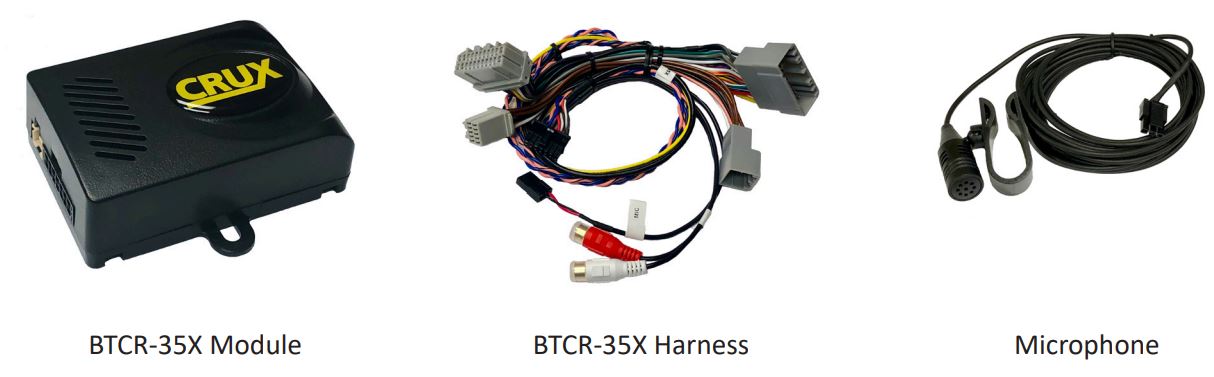
BTCR-35X Bluetooth Handsfree or Four Channel Audio Streaming or Auxiliary Input for Select Chrysler, Dodge and Jeep Vehicles User Manual - PARTS INCLUDED

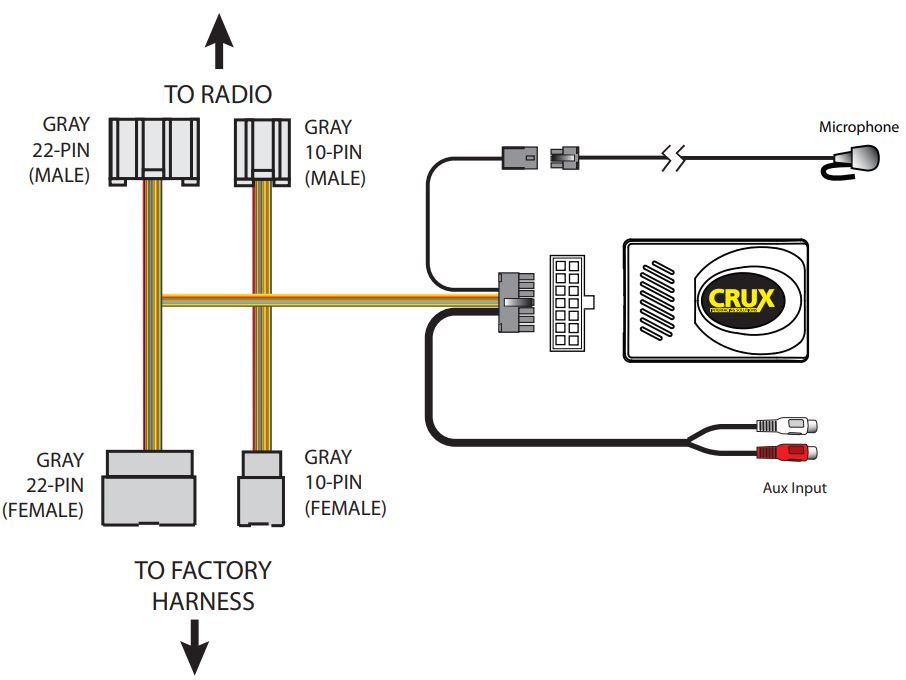
INSTALLATION DIAGRAM:

BTCR-35X Bluetooth Handsfree or Four Channel Audio Streaming or Auxiliary Input for Select Chrysler, Dodge and Jeep Vehicles User Manual - INSTALLATION DIAGRAM

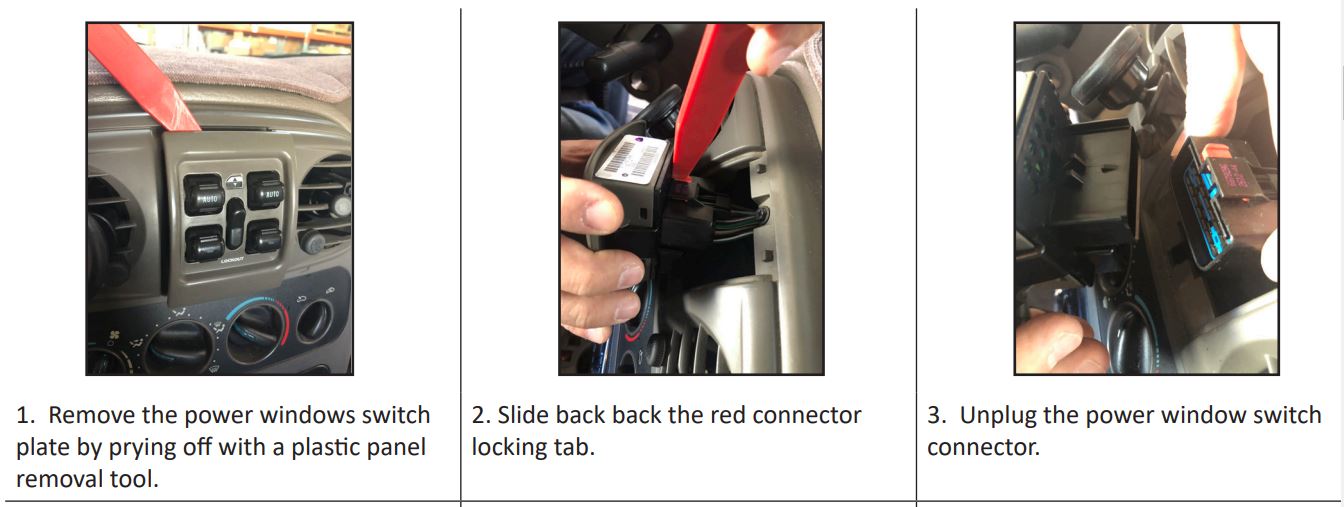
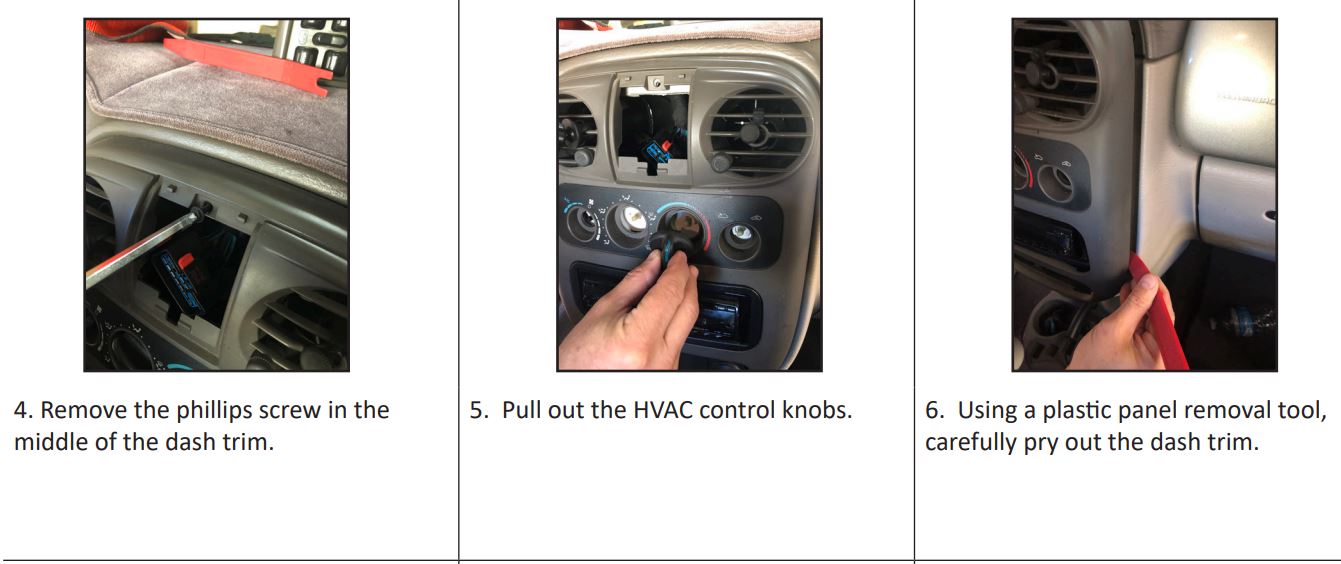
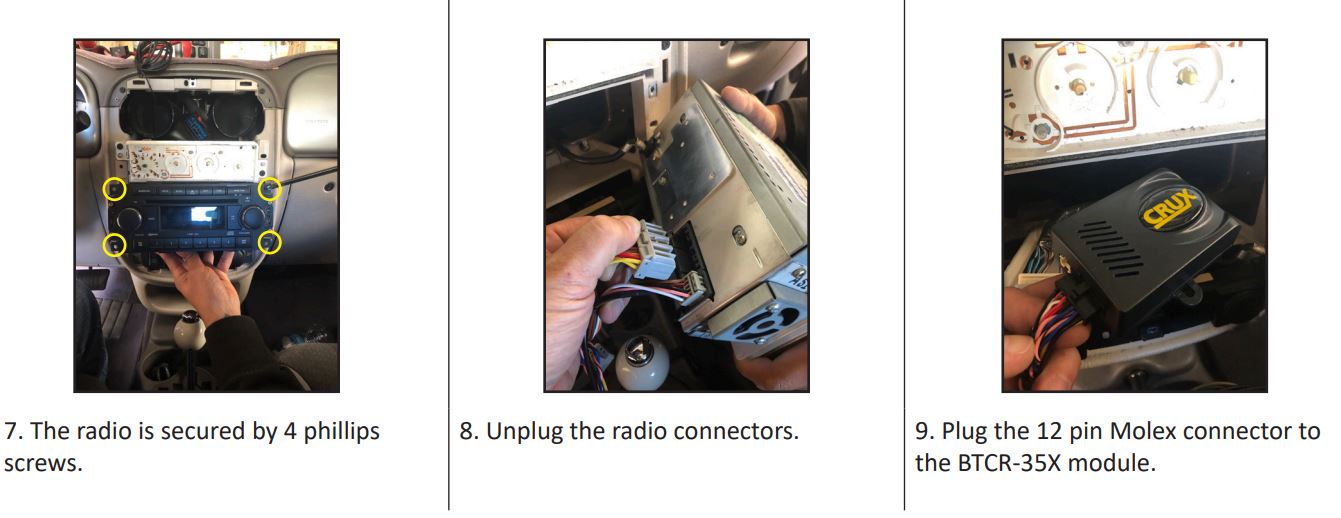
INSTALLATION INSTRUCTIONS:

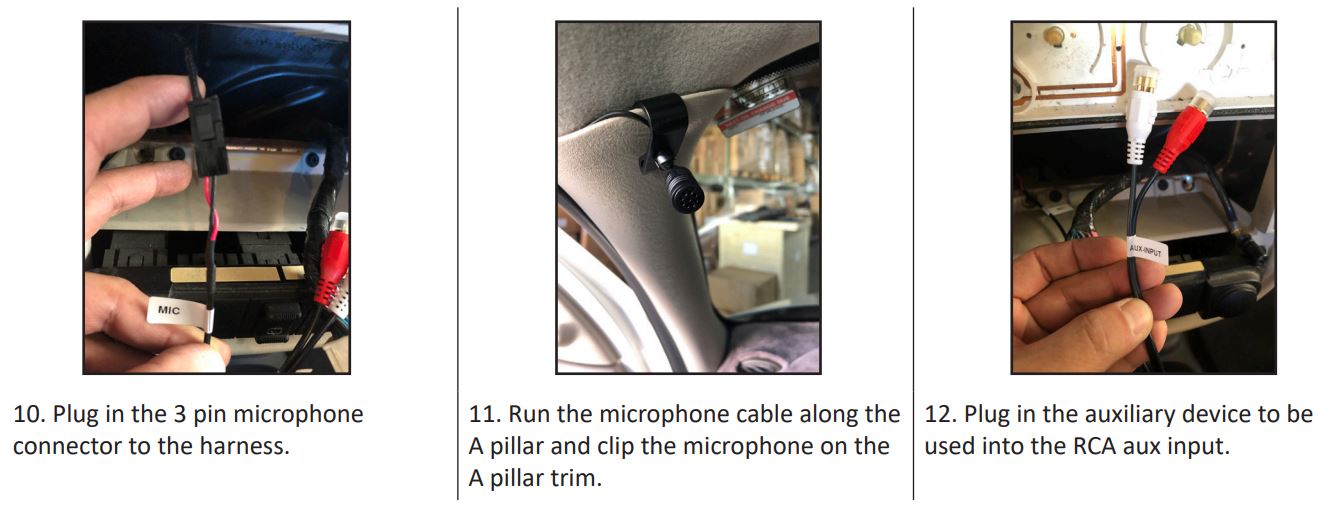
BTCR-35X Bluetooth Handsfree or Four Channel Audio Streaming or Auxiliary Input for Select Chrysler, Dodge and Jeep Vehicles User Manual - INSTALLATION INSTRUCTIONS BTCR-35X Bluetooth Handsfree or Four Channel Audio Streaming or Auxiliary Input for Select Chrysler, Dodge and Jeep Vehicles User Manual - INSTALLATION INSTRUCTIONS BTCR-35X Bluetooth Handsfree or Four Channel Audio Streaming or Auxiliary Input for Select Chrysler, Dodge and Jeep Vehicles User Manual - INSTALLATION INSTRUCTIONS BTCR-35X Bluetooth Handsfree or Four Channel Audio Streaming or Auxiliary Input for Select Chrysler, Dodge and Jeep Vehicles User Manual - INSTALLATION INSTRUCTIONS

OPERATION:

  1. Turn on the radio and go to the Bluetooth settings on the phone.
  2. Pair the phone to blueLogic.
  3. Change the source on the radio to VES/DVD mode.
  4. Play music on your phone and audio will be heard on the car speakers.
  5. BT music will stop when the source is changed, i.e. FM/AM/CD.
  6. BT music will automatically resume when the source is changed back to VES/DVD mode.
  7. When there is an incoming call, the module will automatically switch to VES/DVD mode and switch back to the source selected before when call is ended.

CONTROL BUTTONS ON RADIO:
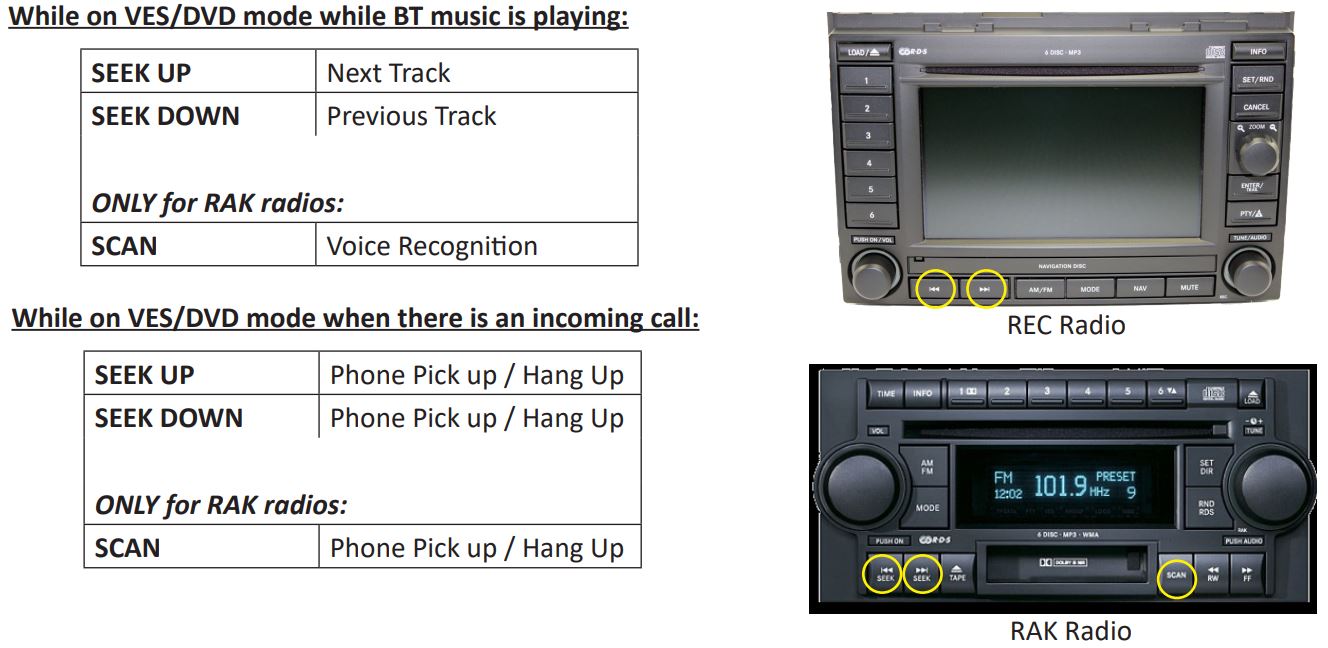
BTCR-35X Bluetooth Handsfree or Four Channel Audio Streaming or Auxiliary Input for Select Chrysler, Dodge and Jeep Vehicles User Manual - CONTROL BUTTONS ON RADIO

CONTROL BUTTONS ON STEERING WHEEL:

BTCR-35X Bluetooth Handsfree or Four Channel Audio Streaming or Auxiliary Input for Select Chrysler, Dodge and Jeep Vehicles User Manual - CONTROL BUTTONS ON STEERING WHEEL

ACTIVATING THE AUXILIARY INPUT FUNCTION:

The Auxiliary Input function can be activated from a steering wheel control button or a radio button. The Auxiliary input takes the place of the factory VES/DVD option.

  1. On the steering wheel controls, press and hold the “SEEK UP” for 2 – 3 seconds.
  2. On the REC radio, press and hold the “SEEK UP” button.
  3. On the RAK radio, press the “>>/FF” button once.

NOTE: The factory VES/DVD option is not supported with this module and needs to be disconnected if present.

VEHICLE APPLICATIONS:

Compatible with RAQ, RAK and REC radios.
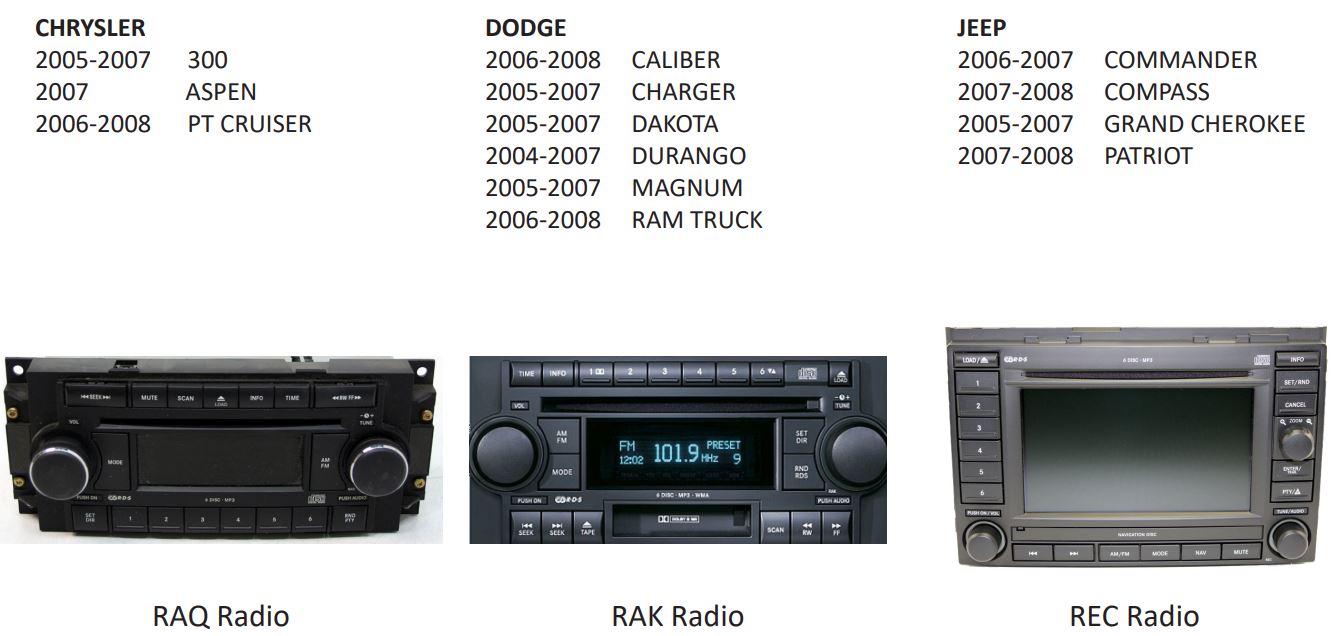
BTCR-35X Bluetooth Handsfree or Four Channel Audio Streaming or Auxiliary Input for Select Chrysler, Dodge and Jeep Vehicles User Manual - VEHICLE APPLICATIONS

BTCR-35X Bluetooth Handsfree or Four Channel Audio Streaming or Auxiliary Input for Select Chrysler, Dodge and Jeep Vehicles User Manual - Crux Interfacing Solutions