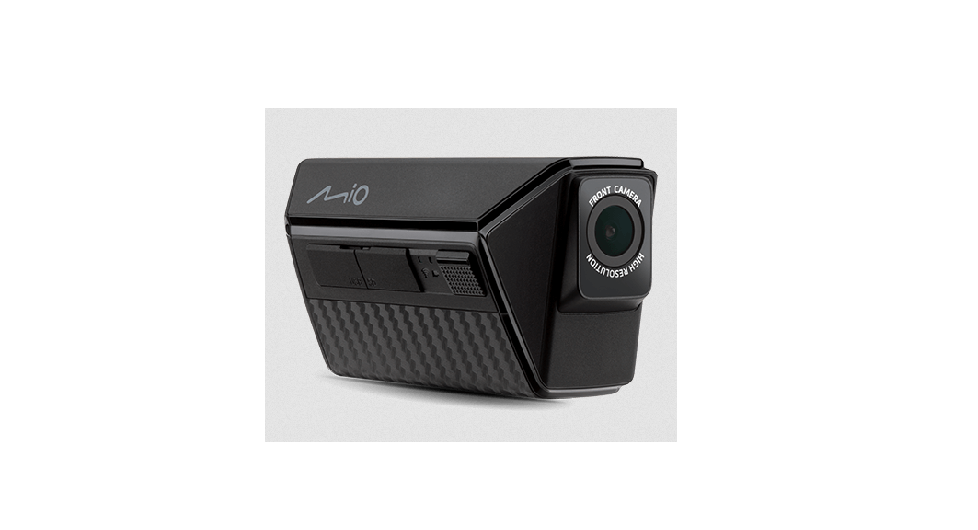
Mitac Digital Technology Corporation N749 Motorcycle Dashcam User Manual
Trademark
All brand and product names are trademarks or registered trademarks of their respective companies.
Disclaimer
Specifications and documents are subject to change without notice. MiTAC does not warrant this document is error-free. MiTAC assumes no liability for damage incurred directly or indirectly from errors, omissions, or discrepancies between the device and the documents.
Note
Not all models are available in all regions.
Depending on the specific model purchased, the colour and look of your device and accessories may not exactly match the graphics shown in this document.
Getting to know your device
 Screenshots and images shown in this manual may differ slightly from the actual product.
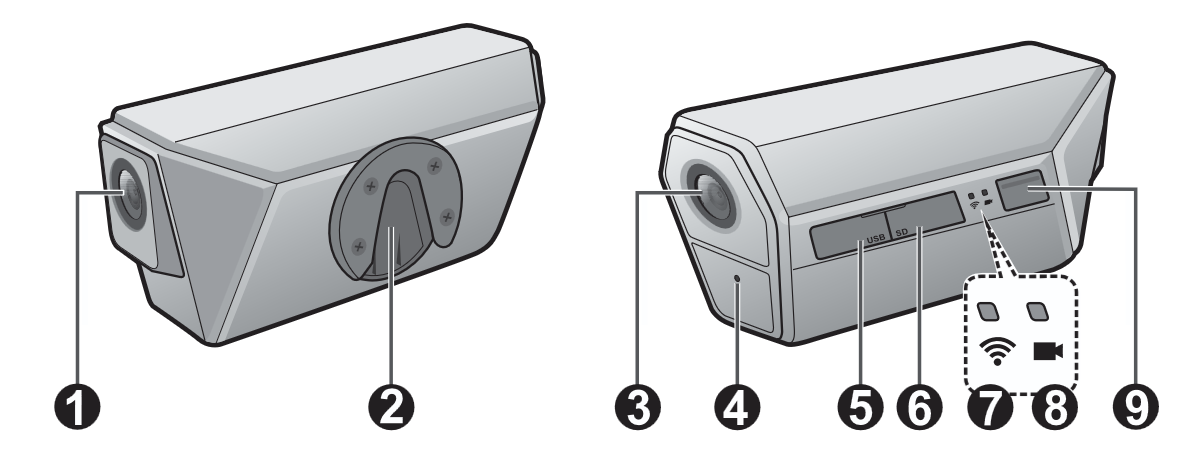
- Front camera
- Mounting slot
- Rear camera
- Microphone
- Charging / data port
- MicroSD slot
- WIFI indicator
- Recording indicator
- Multi-function button
Using a memory card
This device supports memory cards with capacity between 32 and 256 GB.
MiTAC does not guarantee the product’s compatibility with MicroSD cards from all manufacturers.
Always keep the memory card slot cover closed to keep moisture out.
A memory card must be inserted before you can start recording. You should use separate MicroSD cards for recording and regular data storage.
DO NOT remove the memory card during recording.
Turn the device off before removing the memory card.
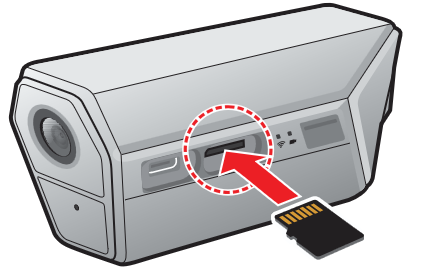
Lift the cover to access the memory card slot. Hold the card (MicroSD) by the edges and gently insert it into the slot as shown in the illustration. Do not apply pressure to the centre of the memory card.
To remove a card, gently push the top edge of the card inwards to release and pull it out of the slot.
Formatting a card
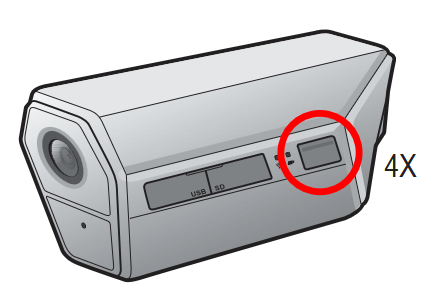
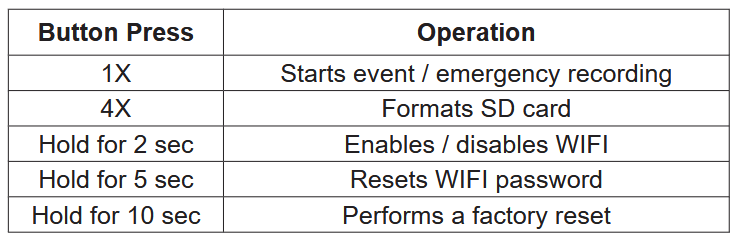
Press the Multi-function Button four times to format the memory card (all data will be erased).
Precautions and notices
- Do not operate the device while steering a motorcycle. Using this product does not change the requirement for the rider to take full responsibility for his or her road behavior. This responsibility includes observing all traffic rules and regulations in order to avoid accidents, personal injuries or property damage.
- Make sure that no object is blocking the camera lens and no reflective material is placed near the lens. Please keep the lens clean.
- Keep the memory card slot cover closed sealed to protect the memory card from dust, debris, and moisture. Do not spray water on the device using a pressure washer.
- The device must be secured to the motorcycle helmet properly to prevent accidental detachment while riding at high speeds.
Charging the recorder
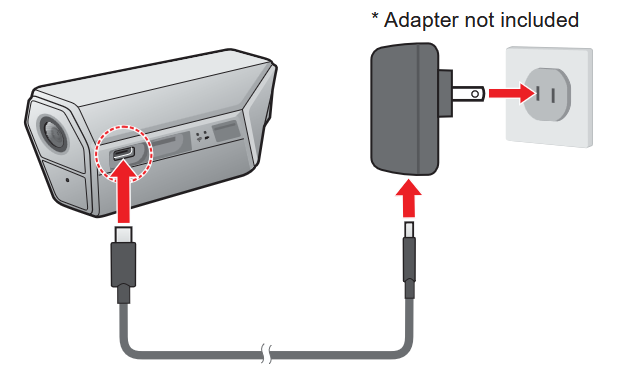
Your device has an internal battery that may not be fully charged out of the box.
Before first use, it is recommended to charge the battery about 4~4.5 hours until it is fully charged.
CAUTION
For optimal lithium battery performance, note the following:
- Do not charge the battery where the ambient temperature is high (such as under direct sunlight).
- Failure to follow battery usage instructions could damage your device or battery, cause bodily injury or property damage, and void the warranty.
- The recorder may not be compatible with some portable chargers. If you must use a portable charger, make sure the output is rated at + 5 V dc / 2 A.
Mounting the motorcycle helmet camera
- Clean the motorcycle helmet with an alcohol wipe and wipe the area dry.
- Peel off the 3M adhesive backing from the helmet mount and affix the mount on the motorcycle helmet. Please note that the orientation of the quick-release clip must match the direction shown in the image:
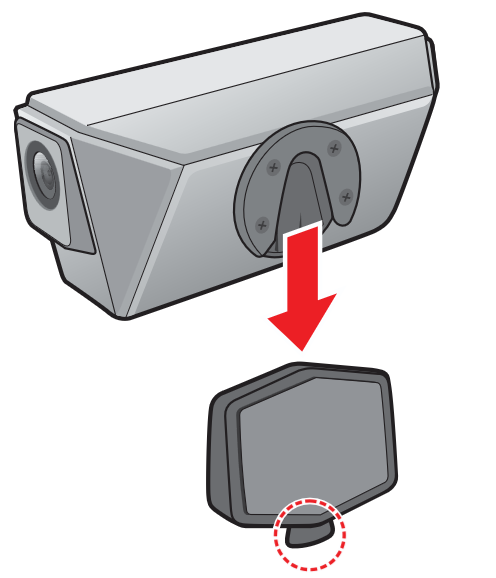
Apply firm pressure to assure good contact between the 3M adhesive tape and helmet surface. - Attach the helmet camera to the mount by sliding it downward until the device snaps into place as indicated by a “click” sound.
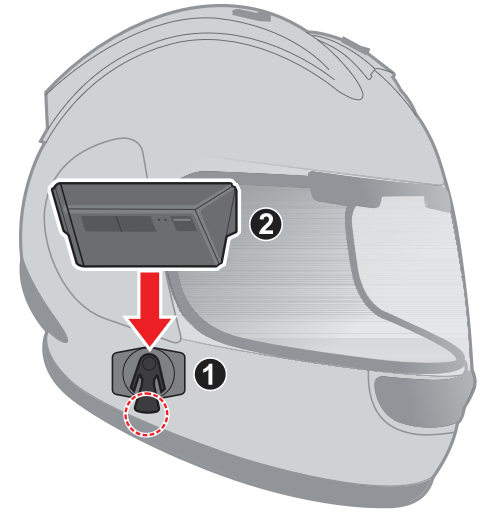
Apply pressure on the clip to release the helmet camera from the mount. Recording stops whenever the helmet camera is not attached to the mount.
Using your device
Button operations
The Multi-function button can be pressed to perform the following operations:
LED indicators
Restarting the device
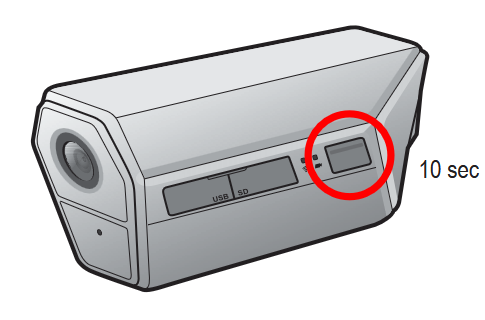
Occasionally, you may need to perform a hardware reset when your device stops responding or if it appears to be “frozen” or unresponsive. Restart the device by pressing and holding the Multi-function Button for at least 10 seconds before releasing the button.
Video recording
Continuous recording
Continuous/normal recording will automatically commence shortly after the helmet camera is attached to the mount. Recording stops when:
- The device is detached from the helmet mount.
- The device has remained in the same location for at least three minutes.
- The device is connected to a smartphone via WIFI.
- The device is connect to a computer via a USB cable.
If continuous recording is stopped as a result of remaining stationary for an extended period of time, recording will automatically resume once motion is detected.
Video recordings are divided into several video clips; recording does not stop between video clips. When the memory card fills up with continuous recordings, it will automatically record over the oldest existing files in this category.
Continuous recordings can be found in the “Normal” category for file playback.
Event recording
Event recordings can be triggered automatically by the G-sensor or manually by pressing the Multi-Function button once.
Events detected by the G-sensor
During continuous recording, if the G-sensor detects a sudden impact or the motorcycle has tipped over, it will prompt the device to capture the event by copying the video file containing the actual event, along with the files recorded right before and after to the “Event” folder.
The sensitivity level of the G-sensor can be adjusted via Magellan MiVue Pro. Refer to “Customizing the settings” for additional information.
Manual event recording
Press the Multi-function Button once to record an event manually. The video file containing the actual event, along with the file recorded right before (if the button is pressed within the first 20 seconds of the current recording) or after (if the button is pressed within the final 20 seconds of the current recording) are copied to the “Event” folder.
When your memory card fills up with event recordings, it will record over the oldest existing files in this category. Event recordings can be found in the “Event” category for file playback.
Trip lapse recording
Trip lapse recording is disabled by default and the default SD card memory configuration does not allocate space for storing trip lapse videos. In order to save trip lapse recordings, memory configuration must be set to Type 1 via Magellan MiVue Pro. Changing memory configuration requires formatting the SD card, please back up important files first.
A trip lapse video is created by extracting one frame from each second of a continuous video then showing these frames in one continuous video. For example, a two-hour trip can be condensed into a video that is approximately eight minutes in length. Normal recording will continue to take place while trip lapse recording is active.
Exporting & sharing GPX routes
Each trip-lapse recording also saves your GPS location data. GPX (GPS Exchange) files can be downloaded and exported from MiVueTM Pro
- In MiVueTM Pro, tap
 > SD card.
 - Select the TRIP GPX tab to view a list of GPX files. Select a file and tap Download.
- Return to the app’s home page and tap on the Downloads (
 ) button.
 - Under the TRIP GPX tab, select one or multiple files to export.
Getting connected
Magellan MiVue Pro
The Magellan MiVue Pro app is compatible with iOS 9.0 (and above) and Android 5.0 (and above) devices. MiTAC does not guarantee the product’s compatibility with smartphones from all manufacturers. Not all MiVue dash cam models support the Magellan MiVue Pro app or all its features.
Magellan MiVue Pro allows you to view, share and back up the videos recorded on a MiVue dash cam via WIFI. Search for “Magellan MiVue Pro” in the Apple App Store or Google Play Store to download the app for free.
Setting up a WIFI connection
The WIFI connection between your device and smartphone is not Internet-enabled.
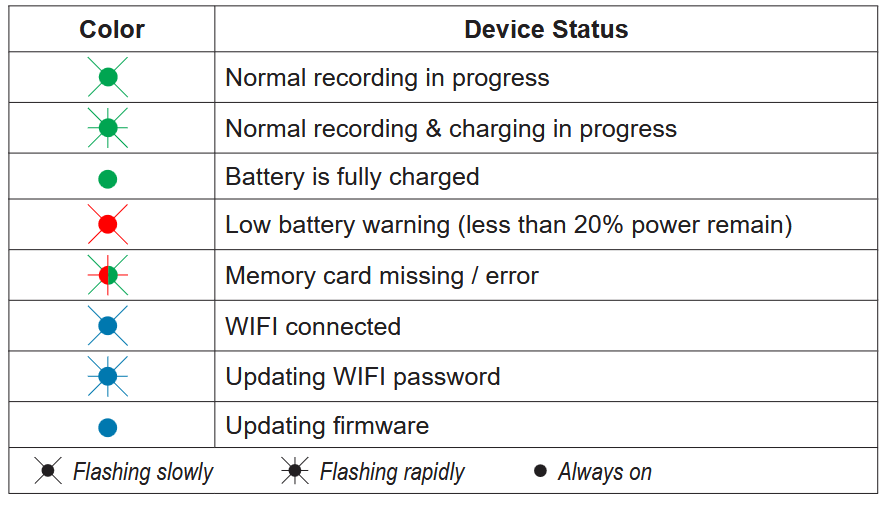
The WIFI function allows you to connect the motorcycle helmet cam to your smartphone. Press and hold the device’s Multi-function Button for two seconds to enable WIFI mode. The WIFI indicator glows in blue once WIFI is activated.
- On the smartphone, make sure WIFI is enabled. Open Magellan MiVue Pro and tap the “+” icon at the centre of the screen.
- Select your device from the product list.
- Tap Select WIFI and select the network you wish to connect to (SSID: MiVue_ xxxx, password: 1234567890).
- Return to Magellan MiVue Pro and tap Done to complete the WIFI connection.
Using Magellan MiVue Pro
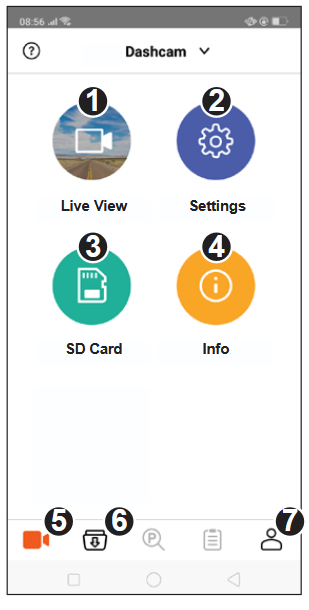
- Live View: Shows the live-view of the front and rear recording cameras.
- Settings: Configures device settings.
- SD Card: Browses files saved on the device’s SD card.
- Info: Displays device information.
- Home: Returns to the app’s main page.
- File Explorer: Browses files downloaded to the app.
- App Info: Changes the app’s storage location and performs firmware updates.
Customizing the settings
Open Magellan MiVue Pro on the connected smartphone and tap > Settings to configure system settings.
System
- Time Zone: Selects your local time zone.
- Date/Time: Sets the date and time manually or by syncing with GPS.
- Distance Unit: Sets the preferred distance unit.
Video Recording
- Video Length: Sets the length of each video clip for a continuous recording.
- Video Resolution: Sets the resolution of the video.
- Trip Lapse: Enables or disables trip lapse recording. The default setting is Off.
- EV: Sets the exposure level of the front and rear cameras to adjust image brightness.
- G-sensor Sensitivity: Sets the sensitivity level of the G-sensor which automatically triggers event recording while continuous recording is in progress.
- Stamps: Sets the information (Coordinates or G-sensor) that will be displayed on the recorded video.
- Speed Stamps: Displays the Average / Max /Real-time speed on the recorded video.
SD Card
- Type 1 / 2: Sets the SD card’s memory configuration.
Not all setting items and options are available for all models.
For more information
Caring for your device
Taking good care of your device will ensure trouble-free operation and reduce the risk of damage.
- Keep your device away from excessive moisture and extreme temperatures.
- Avoid exposing your device to direct sunlight or strong ultraviolet light for extended periods of time.
- Do not place anything on top of your device or drop objects on your device.
- Do not drop your device or subject it to severe shock.
- Do not subject your device to sudden and severe temperature changes. This could cause moisture condensation inside the unit, which could damage your device. In the event of moisture condensation, allow the device to dry out completely before use.
- Never clean your device with it powered on.
- Never attempt to disassemble, repair or make any modifications to your device. Disassembling, modifying or any attempt to repair could cause damage to your device, may inflict bodily harm or damage to property and will void any warranty.
- Do not store or carry flammable liquids, gases or explosive materials in the same compartment as your device, its parts or accessories.
- To discourage theft, do not leave the device and accessories in plain view in an unattended vehicle.
- Overheating may damage the device.
- Operating temperature: 0 – 45°C (charge mode) -10 – 60°C (discharge mode)
About GPS
- GPS is operated by the United States government, which is solely responsible for the performance of GPS. Any change to the GPS system can affect the accuracy of all GPS equipment.
- GPS satellite signals cannot pass through solid materials (except glass). When you are inside a tunnel or building, GPS positioning is not available. Signal reception can be affected by situations such as bad weather or dense overhead obstacles (such as trees, tunnels, viaducts and tall buildings).
- The GPS positioning data is for reference only.
Regulatory information
For regulatory identification purposes, this product is assigned a model number of N749.
Federal Communication Commission Interference Statement

This device complies with part 15 of the FCC Rules. Operation is subject to the following two conditions: (1) This device may not cause harmful interference, and (2) this device must accept any interference received, including interference that may cause undesired operation.
This device has been tested and found to comply with the limits for a Class B digital device, pursuant to Part 15 of the FCC Rules. These limits are designed to provide reasonable protection against harmful interference in a residential installation. This equipment generates, uses, and can radiate radio frequency energy, and, if not installed and used in accordance with the instructions, may cause harmful interference to radio communications. However, there is no guarantee that interference will not occur in a particular installation If this equipment does cause harmful interference to radio or television reception, which can be determined by turning the equipment off and on, the user is encouraged to try to correct the interference by one or more of the following measures:
- Reorient or relocate the receiving antenna.
- Increase the separation between the equipment and receiver.
- Connect the equipment into an outlet on a circuit different from that to which the receiver is connected.
- Consult the dealer or an experienced radio/TV technician for help.
FCC Caution
Any changes or modifications not expressly approved by the party responsible for compliance could void the user‘s authority to operate the equipment. The antenna(s) used for this transmitter must not be co-located or operating in conjunction with any other antenna or transmitter.
FCC RF Radiation Exposure Statement
This equipment complies with FCC radiation exposure limits set forth for an uncontrolled environment. This equipment should be installed and operated with minimum distance 20cm between the radiator & your body.
End users must follow the specific operating instructions for satisfying RF exposure compliance.
Industry Canada statement
This device complies with ISED’s licence-exempt RSSs. Operation is subject to the following two conditions: (1) This device may not cause harmful interference, and (2) this device must accept any interference received, including interference that may cause undesired operation.
Radiation Exposure Statement
This equipment complies with ISED radiation exposure limits set forth for an uncontrolled environment. This equipment should be installed and operated with minimum distance 20cm between the radiator & your body.
WEEE

This product must not be disposed of as normal household waste, in accordance with the EU directive for waste electrical and electronic equipment (WEEE – 2012/19/EU). Instead, it should be disposed of by returning it to the point of sale, or to a municipal recycling collection point.