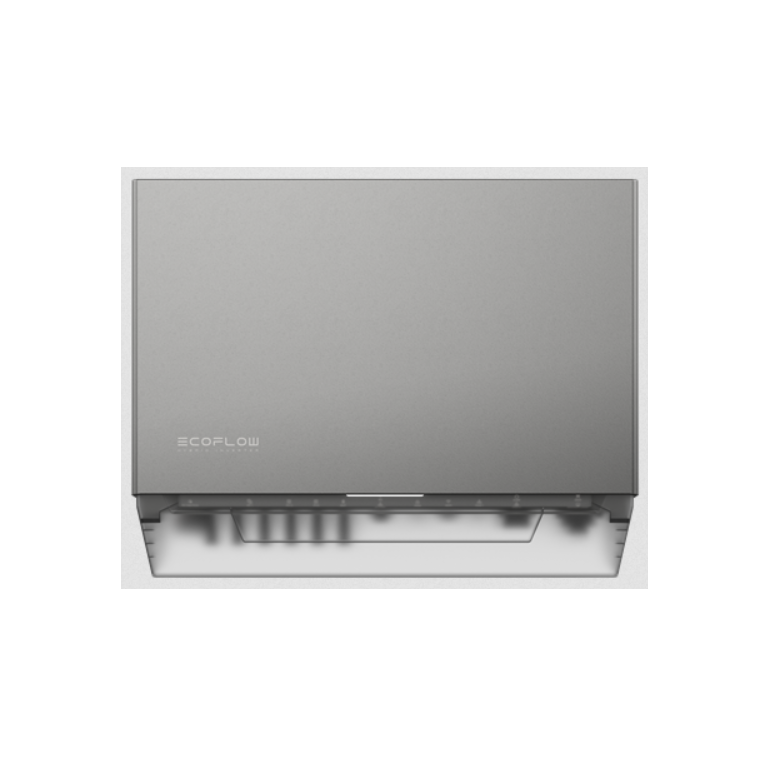
EcoFlow PowerOcean Plus Hybrid Inverter User Manual
About this Manual
DISCLAIMER
Read this user manual carefully before using the product to ensure that you completely understand the product and can correctly use it. After reading this user manual, keep it properly for future reference. Improper use of this product may cause serious injury to yourself or others, or cause product damage and property loss. Once you use this product, it is deemed that you understand, approve and accept all the terms and content in this document. EcoFlow is not liable for any loss caused by the user’s failure to use this product in compliance with this user manual.
In compliance with laws and regulations, EcoFlow reserves the right to final interpretation of this document and all documents related to this prod- uct. This document is subject to changes (updates, revisions, or termination) without prior notice. Please visit EcoFlow’s official website to obtain the latest product information.
INTENDED USE
This User Manual complements the product’s Installation Guide. While the Installation Guide offers instructions for the installation and initial setup of the product, this manual provides a general understanding of product functions and features.
Please note that all illustrations in this manual are for demonstration only and may vary from the actual product due to regions and firmware versions.
Safety Instructions
SYMBOL CONVENTIONS
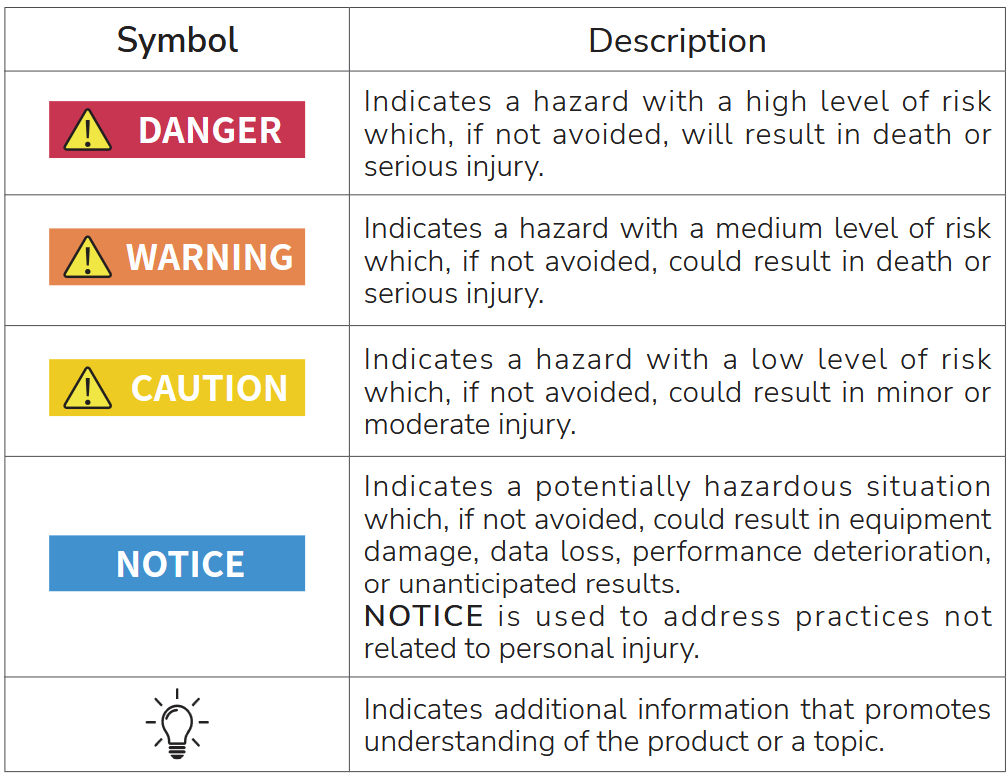
The following table describes the symbol conventions used in this document. Please note that all the instructions and cautions on the equipment or in related documents are only supplements to local laws and regulations.
GENERAL REQUIREMENTS

- Do not work with power on during installation.

- When the photovoltaic array is exposed to light, it supplies a d.c. voltage to the PCE.

- The product must only be operated with PV modules of protection class II in accordance with IEC 61730, application class A. The PV modules must be compatible with this product. Do not ground the PV array positive/nega- tive hole.
- If the power cord of this equipment is damaged, it must be replaced by the manufacturer, customer service department or qualified personnel to prevent a safety hazard.
- Do not touch the exposed cable with your hands.
- Make sure the cables, connectors and ports are dry before starting up the equipment. Make sure all three are connected securely.
- Do not install, use, or operate outdoor equipment and cables in harsh weather conditions such as lightning, rain, snow, and level 6 or stronger wind.
- Tighten the screws to the specified torque using tools when installing the equipment.
- After installing the equipment, remove the remnants of the device installation area, such as cardboard boxes, foam, plastic, wire ties, stripped insulation materials, etc.
- All warning label and nameplates on the equipment should be visible after installation is complete. Do not scrawl, damage, or block any warning label on the device.
- Understand the components and functioning of a grid-tied PV power system and relevant local standards.
- Do not open the host panel of the equipment without permission.
- Do not reverse engineer, decompile, disassemble, adapt, add code to the device software or alter the device software in any other way. Any other operation that violates the original design specifications of the device hardware and software is not allowed.
- If there is a probability of personal injury or equipment damage during operations on the equipment, immediately stop the operations, take feasible protective measures.
- Use tools correctly to avoid hurting people or damaging the equipment.
- Do not touch the energized equipment, as the enclosure is hot.
- Use insulated tools when operating equipment and wear personal protective equipment to ensure personal safety. Wear anti-static gloves, clothing and wristbands when touching electronic devices to protect equipment from damage.
- Prior to performing any work on the equipment, always disconnect it from all voltage sources as described in this section. Always adhere to the prescribed sequence.
- Before installing PV modules, please read its user manual carefully.
- The system is not suitable for power supplying life-sustaining medical devices. It cannot guarantee backup power in all circumstances.
- Do not connect loads between the inverter and the AC switch that directly connects to the inverter.
PERSONNEL REQUIREMENTS
- Personnel who plan to install or maintain EcoFlow equipment must receive thorough training, understand all necessary safety precautions, and be able to correctly perform all operations.
- Only qualified professionals are allowed to install, operate, and maintain the equipment.
- Personnel who will operate the equipment, including operators, trained personnel, and professionals, should possess the local national required qualifications in special operations such as high-voltage operations, working at heights, and operations of special equipment.

Professionals: personnel who are trained or experienced in equipment operations and are clear of the sources and degree of various potential hazards in equipment installation, operation, and maintenance.
ELECTRICAL SAFETY
GROUNDING
- For the equipment that needs to be grounded, install the ground cable first when installing the equipment and remove the ground cable last when removing the equipment.
- Ground the PE hole of GRID connector, BACKUP connector and the equipment enclosure.
- Do not damage the ground conductor.
- Do not operate the equipment in the absence of a properly installed ground conductor.
- Ensure that the equipment is connected permanently to the protective ground. Before operating the equipment, check its electrical connection to ensure that it is securely grounded.
GENERAL REQUIREMENTS
- Before connecting cables, ensure that the equipment is intact. Otherwise, electric shocks or fire may occur.
- Ensure that all electrical connections comply with local electrical standards.
- Obtain approval from the local electric utility company before using the equipment in grid-tied mode.
- Ensure that the cables installer prepared meet local regulations.
- Use dedicated insulated tools when performing high-voltage operations.
- Before connecting a power cable, check that the label on the power cable is correct. When fabricating cables and installing connectors on site, follow the respective instructions in this manual and the requirements of local laws and regulations.
- Before operating the equipment, disconnect all power to the equipment and wait for the corresponding delayed discharge time to ensure that the equipment is completely deenergized.
CABLING
- The cabling path must avoid the equipment cooling system and parts.
- When routing cables, ensure that a distance of at least 30 mm exists between the cables and heat-generating components or areas. This prevents damage to the insulation layer of the cables.
- Bind cables of the same type together. When routing cables of different types, ensure that they are at least 30 mm away from each other. Mutual entanglement or cross-deployment is not allowed.
- Ensure that the cables used in a grid-tied PV power system are properly connected and insulated and meet specifications.
INSTALLATION ENVIRONMENT REQUIREMENTS
- Ensure that the equipment is installed in a well ventilated environment.
- To prevent fire due to high temperature, ensure that the ventilation vents or heat dissipation system are not blocked when the equipment is under operation.
- Do not expose the equipment to flammable or explosive gas or smoke. Do not perform any operation on the equipment in such environments.
- Do not place the equipment next to any heat source, fire source, or water source, and not to perform any operation on the equipment next to that heat source, fire source, or water source.
EQUIPMENT AND PERSONNEL SAFETY REQUIREMENTS
MOVING THE EQUIPMENT
- When moving the equipment by hand, wear protective gloves to prevent injuries.
- Move the equipment with precaution as it is heavy. When two or more people are needed to assist in moving the equipment, please ensure communication and coordination between personnels to prevent being crushed or sprained.
USING TOOLS
- Use wooden or fiberglass ladders when you need to perform live working at heights.
- Before using a ladder, check that it is intact and confirm its load bearing capacity. Do not overload it.
- Make sure the operator is regulated in the use of installation tools, such as ladders, electric paddles, drills, etc. Make sure the tool power cord is not tangled.
- When installing, strictly prevent screws, nuts and spacers from falling inside the equipment and ensure that the tools (such as electric drill bit) do not fall into the gap between the installed equipment and the wall to prevent delaying the installation.
DRILLING HOLES
- Wear goggles and protective gloves when drilling holes.
- When drilling holes, protect the equipment from shavings or dust. After drilling, clean up any shavings or dust that have accumulated at the instal- lation site in a timely manner, otherwise, it may block the drilled hole.
GROUNDING CONDUCTOR MONITORING
The inverter is equipped with a grounding conductor monitoring device. This grounding conductor monitoring device detects when there is no grounding conductor connected and disconnects the inverter from the utility grid if this is the case. Depending on the installation site and grid configuration, it may be advisable to disable the grounding conductor monitoring. This can be necessary, if there is no neutral conductor present and you intend to install the inverter between two line conductors.
- Grounding conductor monitoring must be disabled after initial start-up depending on the grid configuration. Safety in accordance with IEC 62109 when the grounding conductor monitoring is deactivated. In order to guarantee safety in accordance with IEC 62109 when the grounding conductor monitoring is deactivated, you have to connect an additional grounding conductor to the inverter.
- Connect an additional grounding conductor that has an cross-section of at least 10 mm2. Ground the PE hole of GRID connector and the equipment enclosure.
DISPOSAL
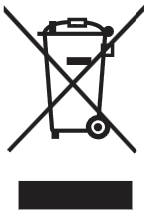
This marking indicates that this product should not be disposed of with other household waste within the EU. Recycle this product properly to prevent possible damage to the environment or a risk to human health via uncontrolled waste disposal and in order to promote the sustainable reuse of material resources. Please return your used product to an appropriate collection point or contact the retailer where you purchased this product. Your retailer will accept used products and return them to an environmen- tally-sound recycling facility.
For information on the disposal of electrical and electronic equipment, please refer to the following website:
https://eu.ecoflow.com/pages/electronic-devices-disposal
SETTING THE RATED RESIDUAL CURRENT OF THE RESIDUAL-CURRENT DEVICE
RCDs (Type A) with a rated residual operating current are recommended to install, 300mA on the AC-GRID side, and 30mA on the AC-BACKUP side, while the use of an RCD with a lower rated residual operating current is also permitted if it is required by the specific local electrical codes.
EMC PROTECTION CLASS
Class B
ENCLOSURE LABEL DESCRIPTION
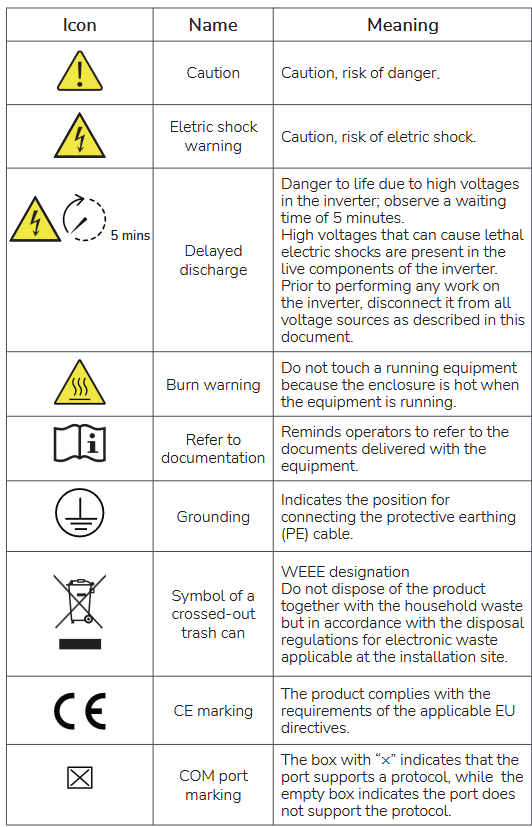
The labels are for reference only.
Overview
The EcoFlow PowerOcean Plus redefines solar power utilisation to an extreme, especially for houses with big and complex roof structures. With up to 36kW solar input, 18kW AC output and dynamic tariff support, the system achieves maximum power independence and financial savings on energy bills.
Full compatibility with all EcoFlow home energy Ecosystem products, smart monitoring and control over your household appliances can be achieved right now.
APPEARANCE
Key components and ports are shown below.
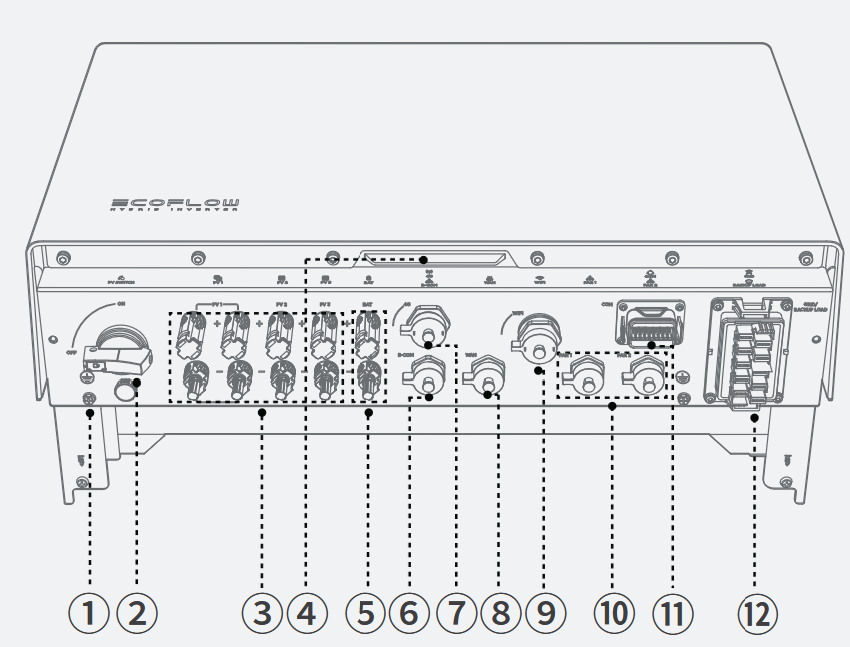
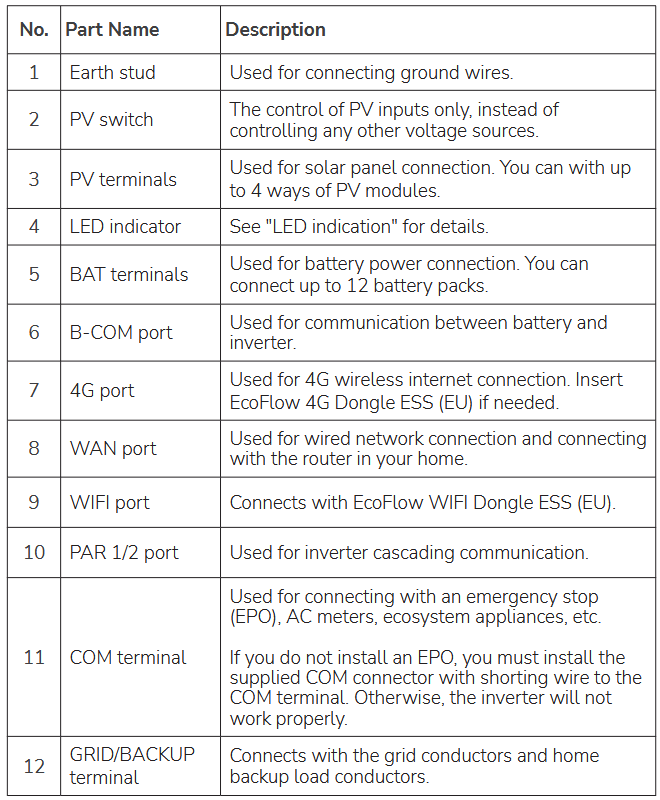
LED INDICATION
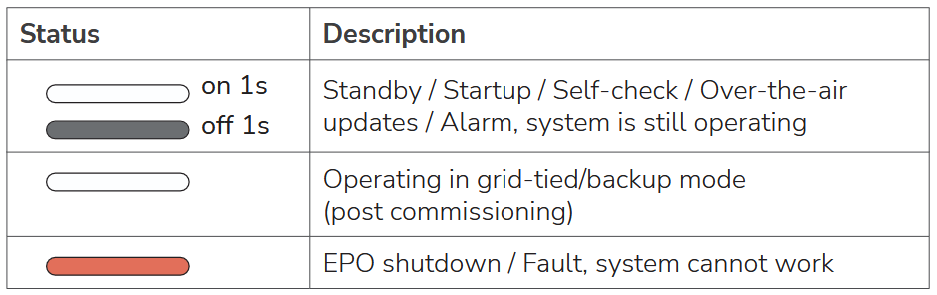
If the LED indicates a faulty status, visit the EcoFlow Pro app to retrieve the error code for troubleshooting.
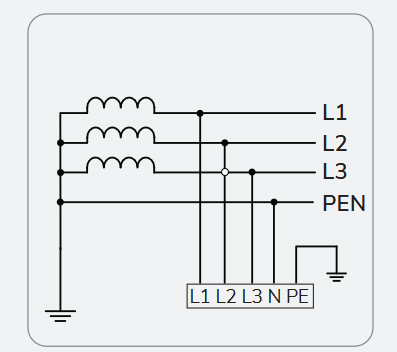
SUPPORTED POWER GRID TYPES
The inverter supports the following power grid type: IT
WORKING PRINCIPLES
The inverter receives inputs from up to 4 PV strings. Then the inputs are grouped into 3 MPPT routes inside the equipment to track the maximum power point of the PV strings. 2 PV strings The DC power is then converted into three-phase AC power through an inverter circuit. Surge protection is supported on both the DC and AC sides.
This equipment applies to residential grid-tied systems. The system includes PV strings, EcoFlow PowerOcean batteries, EcoFlow PowerOcean Plus hybrid inverter, EcoFlow PowerOcean Plus Battery Junction Box & Base, AC switches, and power distribution units.
System Installation
- Only qualified professionals are allowed to install, operate, and maintain the equipment.
Refer to Installation Guide delivered with the equipment for installation, or download the guide at
https://homebattery.ecoflow.com/eu/documentation
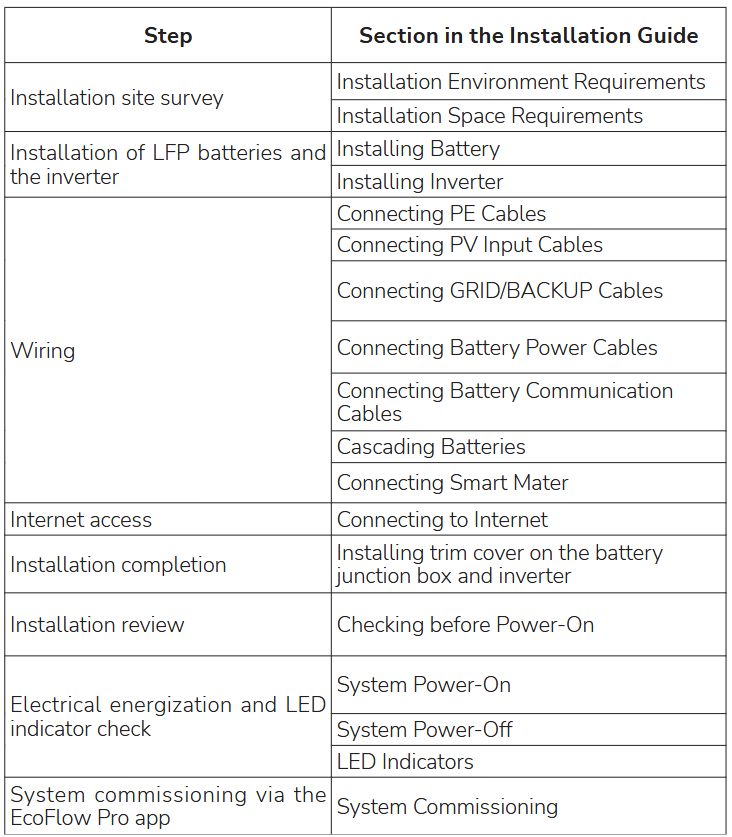
Installation procedure and the corresponding section is shown below
System Operation
SYSTEM POWER-ON
PROCEDURE (PV MODULE CONFIGURED)
- Set the BATTERY SWITCH on top of the Junction Box to ON position.
- Turn on the AC switch between the inverter and the power grid.
- Set the PV SWITCH at the bottom of the inverter to ON position.
- Observe the LED to check the inverter operating status.
PROCEDURE (NO PV MODULE CONFIGURED)
- Set the BATTERY SWITCH on top of the Junction Box to ON position.
- Turn on the AC switch between the inverter and the power grid.
- Set the PV SWITCH at the bottom of the inverter to ON position.
- After commissioning, press and hold for three seconds the BATTERY ON/ OFF button on top of the battery junction box.
- Observe the LED to check the inverter operating status.
SYSTEM POWER-OFF
- After the inverter powers off, the remaining electricity and heat may still cause electric shocks and body burns. Therefore, put on protective gloves and begin operating the equipment five minutes after the power-off.
- Tap shutdown command via the app.
- Turn off the AC switch between the inverter and the power grid.
- Set the PV SWITCH at the bottom of the inverter to OFF position.
- (Optional) Secure the PV SWITCH with a lock to prevent accidental startup. The lock is prepared by the customer.
- Set the BATTERY SWITCH on top of the Junction Box to OFF position.
- (Optional) Secure the BATTERY SWITCH with a lock to prevent accidental startup. The lock is prepared by the customer.
- Press and hold the BATTERY ON/OFF button of the junction box for 10 seconds, until the indicator is off.
APP DOWNLOAD
EcoFlow provides thorough support for the system. Both the home owner and installer benefit from our comprehensive guides and resources.
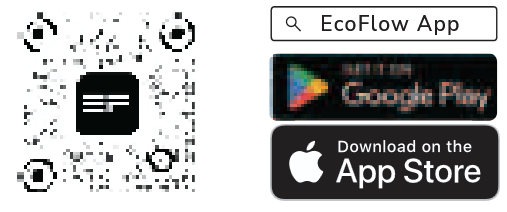
- For home Owner
Effortlessly manage, monitor, and control your PowerOcean devices through a sleek, user-friendly interface via app or web management. Access real-time energy data, detailed power generation, storage and energy bills savings anytime and anywhere. Professional technical support is also readily available when needed.
Scan the QR code or download at
https://download.ecoflow.com/app
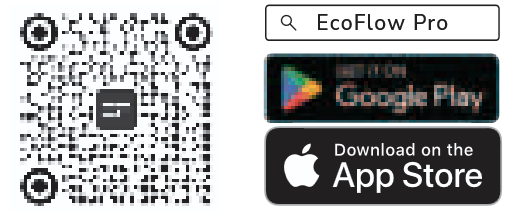
- For Installer
Streamline the commissioning process, monitor device status in real-time, access detailed troubleshooting solutions for system faults and also offer customer support from EcoFlow professional support team.
Scan the QR code or download at
https: //download.ecoflow.com/ecoflowproapp
OPERATION MODE
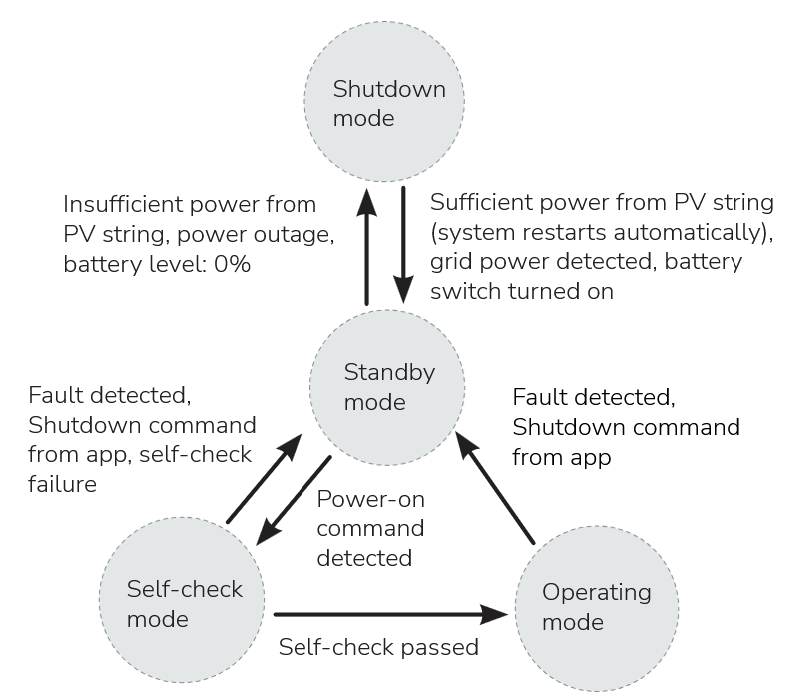
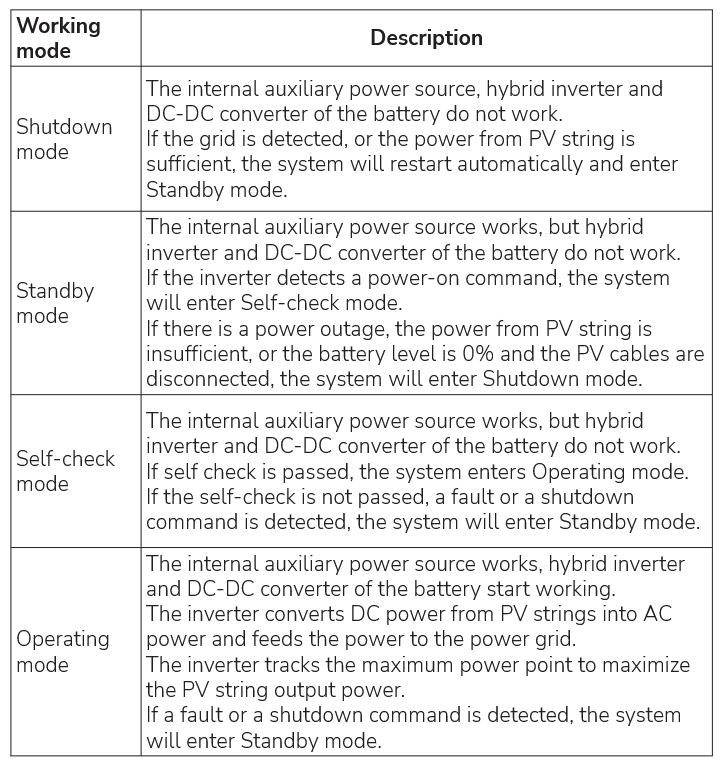
The PowerOcean Plus energy storage system can work in shutdown, standby, self-check or operating mode.
BACK-UP FUNCTION
- For hybrid inverters, both PV modules and batteries need to be configured in the system installation typically and there is sufficient power from batteries or PV modules in backup mode, otherwise, the backup power supply will be automatically terminated. EcoFlow shall hold no liability for any consequences arising from failing to observe this instruction.

To prevent the power backup function from failing, instructions as below must be observed:
- The system is not suitable for powering life-sustaining medical devices. It cannot guarantee backup power in all circumstances.
- Do not connect any loads that require an uninterrupted energy supply.
- Do not connect the loads whose total capacity is greater than the maximum Back-Up capacity.
The backup function ensures that the inverter forms a three-phase battery- backup grid that uses energy from the battery and the PV system that is directly connected to the inverter to power the household loads in the event of a utility grid outage. The backup function is enabled by default.
When a utility grid outage occurs:
The backup loads connected to the AC-BACKUP terminal are connected and supplied to the AC-GRID terminal via an integrated bypass contactor. The contactor opens when a utility grid outage occurs. Thehe backup loads are switched to be supplied by the energy stored in the battery and the PV modules connected directly to the inverter.
Batteries keep being charged by the existing PV system during backup operation.
However, the inverter is able to create a stable battery-backup grid only when sufficient power is available in the battery. Battery-backup operation starts automatically when sufficient energy is available from the PV system.
Utility grid recovers:
The backup operation is disabled automatically and the loads are supplied with energy from the power grid and PV system.
Backup switching time:
Under normal circumstances, the back up switching time during grid outage is less than 20 ms, which will be more than 20ms when low-voltage ride- through function is enabled by default based on local electrical code.
You can set charging and discharging limit in the EcoFlow app.
BACK-UP OVERLOAD PROTECTION
When single overload protection occurs, the inverter can restart automatically. However, the restarting time will be extended (5 min at most) if it repeats. For a faster restarting, try it via app. Try removing the loads which may cause very high start-up current surges.
OPTIMIZE SOLAR AGAINST SHADE
The system will optimize solar generation in shaded conditions at your setup intervals to track the maximum power point. Solar generation may fluctuate under this condition.
This Function is disabled by default.
To enable it, switch on Commissioning > Optional setup > Optimize solar generation in the EcoFlow Pro app when the installer performs system commissioning.
RCR OR DRM DETECTION
Ripple control receiver (RCR) is an interface between a PV system and power grid company that enables the grid operator to reduce the feed- in power, required in Germany and some European regions for more than 25kW inverters.
Demand Response Mode (DRM) which enables the inverter to respond to signals sent to it remotely, is required in Australia. Generally, if the grid is overloaded, the utility company will specify whether the PV system should reduce the feed-in power to 0%, 30%, 60% of the rated power.
This Function is enabled by default.
To disable it, switch on Commissioning > Testing > DI active scheduling in the EcoFlow Pro app when the installer performs system commissioning. Or custom the DI values.
CUSTOM PARAMETER
You can custom the following parameters in Commissioning > Device settings > Customize settings in the EcoFlow Pro app when the installer performs system commissioning.
- Connection parameters
- Voltage Protection parameters
- Frequency Protection parameters
- Reactive Power parameters
- Other parameters
System Maintenance & Replacement
- Turn off the AC and DC switches of the inverter and the battery junction box when maintaining the electric equipment or power distribution equipment connected the equipment.
- Wear proper PPE before any operations.
- Place temporary warning signs or erect fences to prevent unauthorized access to the maintenance site.
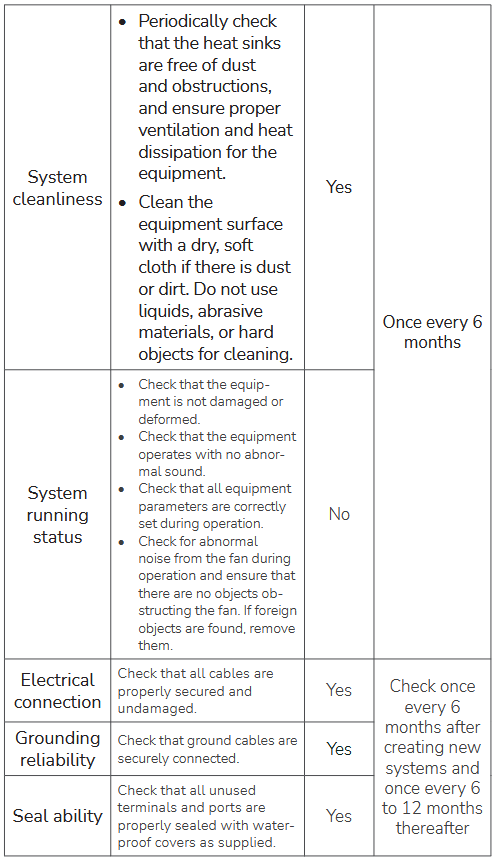
ROUTINE MAINTENANCE
To ensure the long-term operating of the equipment, you are acdvised to perform routine maintenance according to this section.

REPLACING THE INVERTER FAN
- You can only replace the whole fan module instead of the individual fan.
To remove the inverter fan:
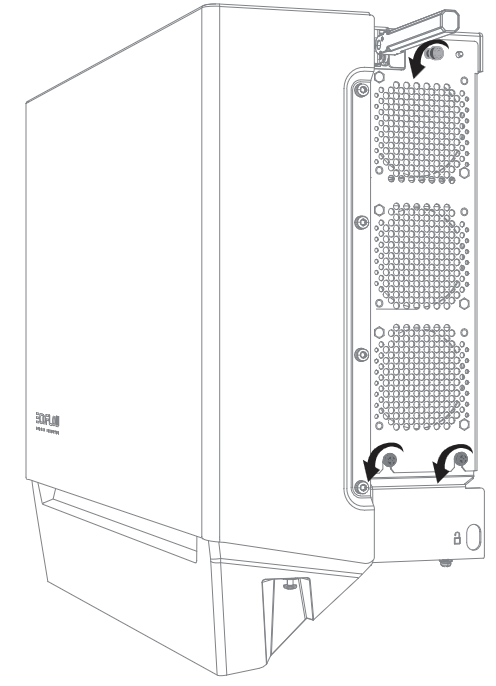
- Lift up the handle.
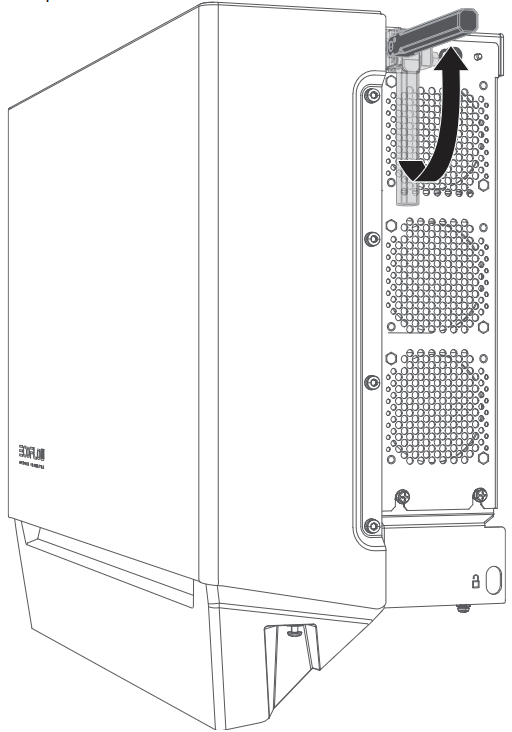
- Loosen the bottom screws, and then the top screw, using a Phillips screwdriver.
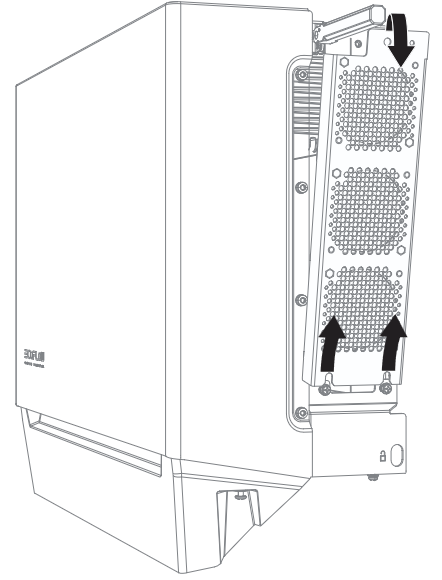
- Pull the top screw by hand to remove the fan module.
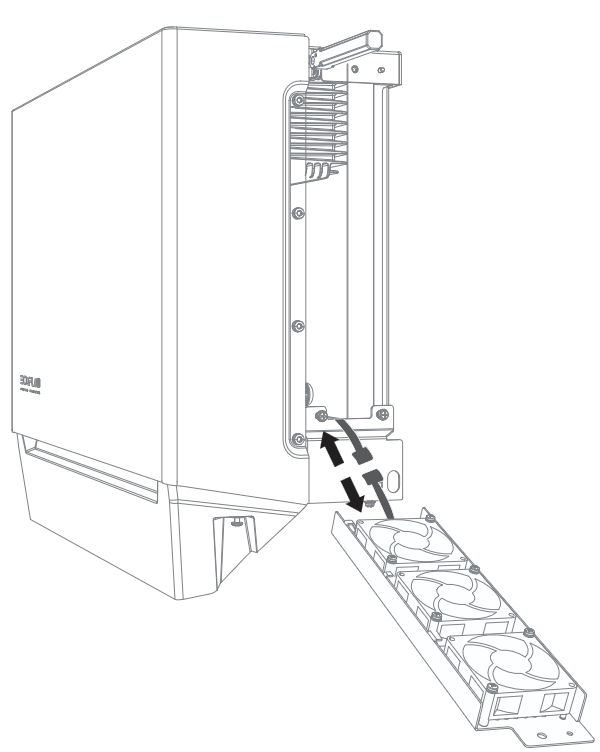
- Disconnect the cable.
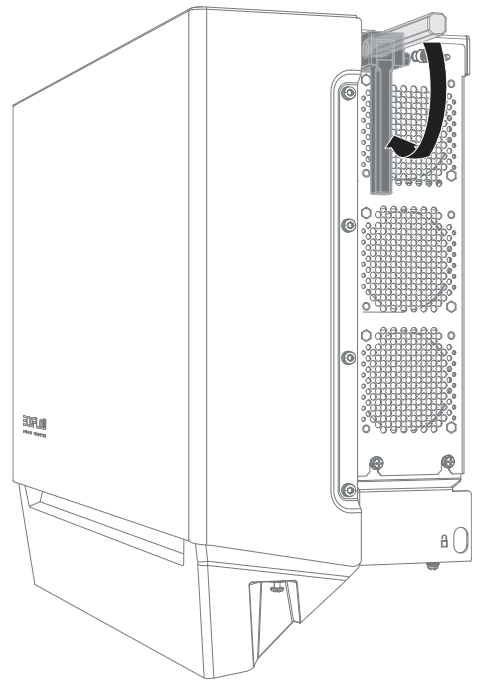
Prepare a new fan and install it on the inverter. To install a new fan:
- Connect the cable.
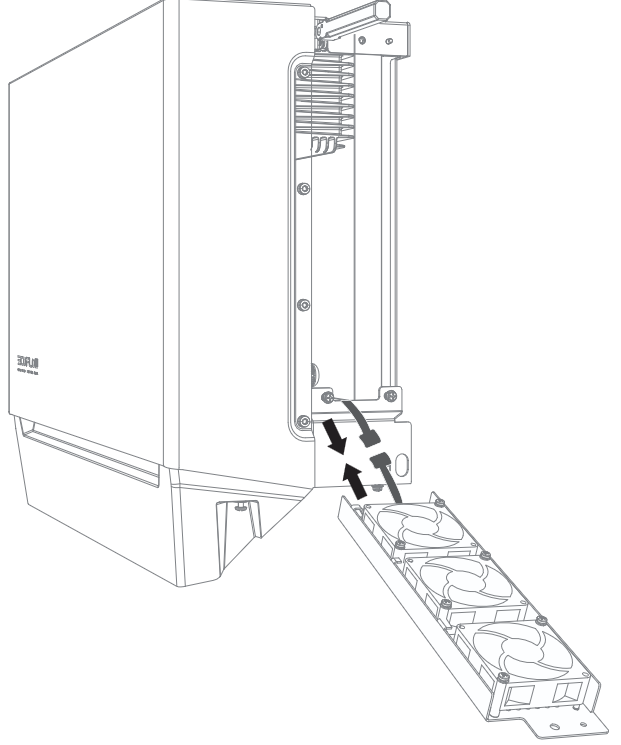
- Align the locating pins and place the fan module into the fan position.
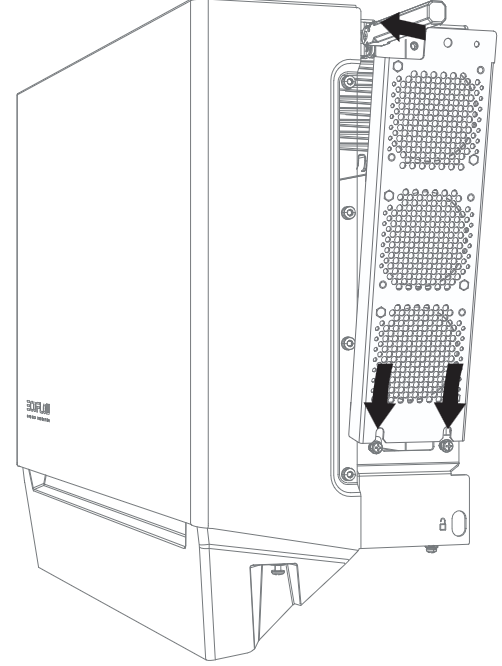
- Secure the top screw.
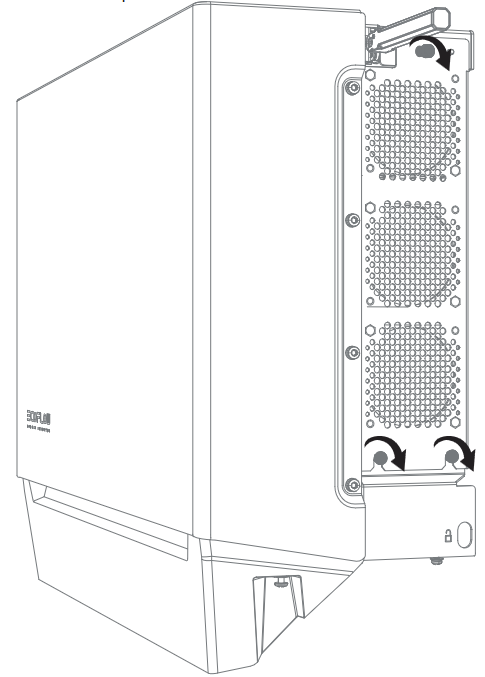
- Secure the bottom screws, and lower the handle.
TROUBLESHOOTING

- The equipment can be powered on only after all faults are rectified. Failing to do so may escalate faults or damage the equipment.
For installers, to troubleshoot the system:
- Visit and log in to the EcoFlow Pro app.
- Retrieve the error code and in-app instructions.
- Completely power off the entire system. Refer to the System Power-Off section.
- Follow the in-app instructions to solve the problems. If the equipment is faulty, contact your dealer.
For home owners, to troubleshoot the system:
- Visit and log in to the EcoFlow app and find the most common FAQ or contact customer support in the Setting > Help and feedback.
- If the problem persists, contact the EcoFlow technical support team.
PRODUCT STORAGE
The following requirements should be met if the equipment is not put into use directly:
- Do not unpack the equipment if you are not using it.
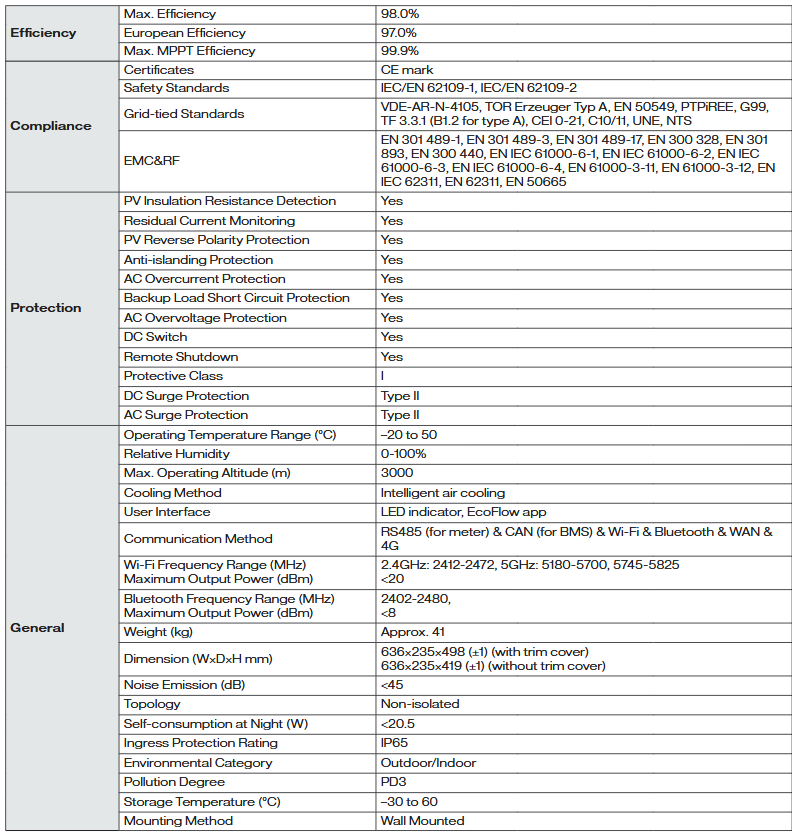
- Keep the storage temperature at –30°C to 60°C and the humidity at 0%– 100% RH.
- The product should be stored in a clean and dry place and be protected from dust and water vapor corrosion.
- Do not stack the inverters to avoid personal injury or equipment damage.
- Do not place this product near water, fire or other heat sources (heaters, direct sunlight, gas ovens, etc.).
- During the storage period, check the equipment periodically.
- If the equipment has been stored for a long time (more than 6 months), it must be checked and tested by professionals before use.
For details about battery maintenance, see EcoFlow PowerOcean LFP Battery User Manual.
REPLACEMENT
- Only professionals with appropriate qualifications are allowed to perform the following activities.
- Wear proper PPE before any operations.
To replace the inverter:
- Power off the entire system. Refer to the System Power-Off section.
- Sequentially disconnect GRID cables, PV input cables, battery cables, communication cables and all modules connecting to the inverter.
- Remove the inverter or other components from the mounting bracket.
- Install a new inverter and new components. For example, if you upgrade the inverter of different model, the battery junction box and WIFI module might be differnet. Refer to the new inverter’s Installation Guide.
- Power on the system and perform system commissioning. Refer to the Installation Guide delivered with the new inverter.
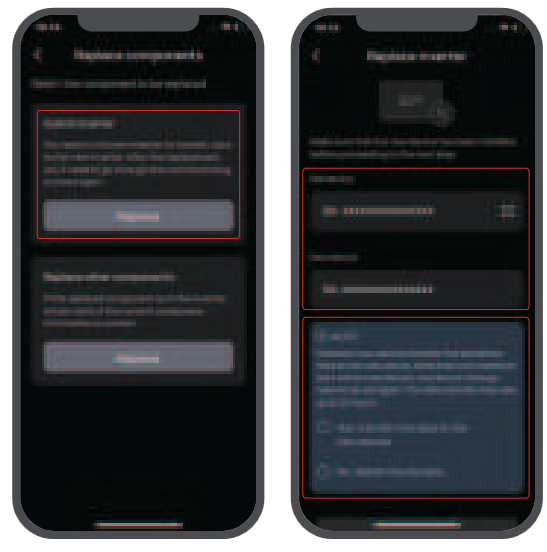
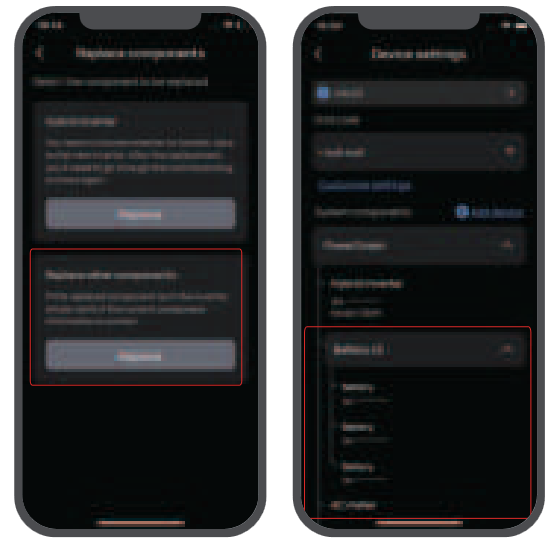
- Transfer the device data to the new inverter or delete the previous data Settings > Replace components in the EcoFlow Pro app.
DECOMMISSIONING
- Before removing a inverter, power it off. Refer to the System Power-Off section.
To decommission the inverter:
- Sequentially disconnect GRID cables, PV input cables, battery cables, communication cables and all modules connecting to the inverter.
- Remove the inverter or other components from the mounting bracket.
- Remove the mounting bracket.
- Pack and store the inverter properly.
If the inverter cannot work anymore, dispose of it according to the local disposal rules for electrical equipment waste.
Hereby, our battery module has met the regulations of BattG in Germany.
Technical Parameters
Network Security & Vulnerability Disclosure
CHANGE MECHANISMS
Users can change their login identity by switching accounts and entering the password corresponding to that account on EcoFlow app login page. See the Installation Guide delivered with the inverter.
SENSORS
- The device can be connected to a smart meter via the COM port for power sampling.
- The device comes with built-in NTC to sample the internal inverter temperature for control strategies.
SECURITY SETTING
Users will be instructed to set an access password during the initial binding of the device. See the Installation Guide delivered with the inverter.
SETUP CHECK
Each input by the user is checked based on the validation rules. The only scenario where the user can make an insecure input is creating a new user account. If the password entered does not comply with the password rules, the app immediately notifies the user via a pop-up window, and the setup process can only proceed when the user enters valid characters.
PERSONAL DATA
The device will record the hotspot information of the wifi accessed by the user so that the device can automatically connect to the corresponding hotspot after re-powering on without having to reenter the information.
TELEMETRY DATA
- Telemetry parameters include home load power consumption, PV production, grid usage, etc., to be revealed to the user via EcoFlow App or web portal.
- Telemetry parameters include internal inverter parameters such as current, voltage, temperature, etc., which are used for safety diagnosis of the device.
ERASING DATA
- Users can visit the home page of the EcoFlow App, and delete the corresponding data by tapping the following in sequence Settings > Reset and erase data.
- User can visit the home page of Ecoflow app, and select Account settings > Delete account to write off app account.
MODEL DESIGNATION
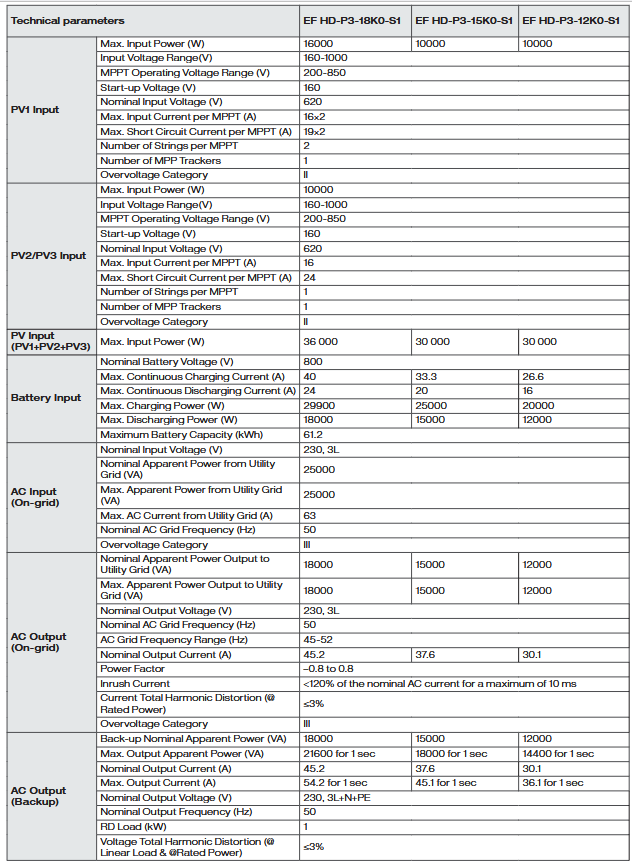
- EF HD-P3-18K0-S1
- EF HD-P3-15K0-S1
- EF HD-P3-12K0-S1
SUPPORT PERIOD
The product warranty and software support period are both 15 years.
VULNERABILITY DISCLOSURE POLICY
For the Vulnerability Disclosure Policy, users can visit Ecoflow’s official website at
https://account.ecoflow.com/agreement/en-uk/EFSRC_Vulnerability_Disclosure_Plan.html
